Monthly Archives: April 2018

Relations and Functions

In mathematics, a relation is a connection between two distinct pieces of data or variables. For example, student name and ID number would be a relation commonly found at a school. What this means is that you can refer to a student by there name and get their ID number and vice versa.  These two pieces of information are connected and refer to each other. Another term for relation is ordered pair, however, this is more commonly use for coordinate graphing. Below is an example of several student names and ID numbers

Student Name (x values) ID Number (y values)
Jill Smith 12345
Eve Jackson 54321
John Doe 24681

Table 1

Two other pieces of information to know are domain and range. The domain represents all x values. In our table above the student names are the x values (Jill Smith, Eve Jackson, John Doe). The range is all of the y-values, THese are represented by ID number in the table above (12345, 54321, 24681).

The table above is nice and neat. However, sometimes the information is not organized into neat rows but is scrambled with the names and ID numbers not lining up. Below is the same information as the table 1 but the ID numbers are scrambled. The arrows tell who the ID number belongs to who.  This is known as mapping.

Student Name ID Number
Jill Smith ↘ 24681
Eve Jackson→ 54321
John Doe↗ 12345

If we find the ordered pair, domain and range it would be as follows.

  • Ordered pair = {(Jill Smith, 123450, (Eva Jackson, 54321), (John Doe,  24681)}
  • domain = {Jill Smith, Eva Jackson, John Doe}
  • Range = {24681, 54321, 12345}

Understanding Functions

A function is a specific type of relation. What a function does is assigns to each element in a domain. Below is an example of a function

f(x) = 2x + 7

Functions are frequently written to look the same as an equation  as shown below

y = 2x + 7

PLugging in different values of x in your function will provide you with a y as shown below

1

Here our x-value is 2 and the y-value is 11.

Of course, you can graph function as any other linear equation. Below is a visual.

save.png

Conclusion

This post explained the power of relations and functions. Relations are critical in computer science in particular relational databases. In addition., Functions are a bedrock in statistics and other forms of math. Therefore it is critical to understand these basic concepts of algebra.

Review of “Michelangelo”

This post is a review of the book Michelangelo by Diane Stanley (pp. 40).

The Summary

This book addresses the life of Michelangelo di Lodovico Buonarroti Simoni perhaps one of the greatest artists of all time. Michelangelo was born in the 15th century (1475) to a middle-class family in Italy during the Renaissance.

As as a small boy, Michelangelo was trained in stonecutting. This stokes a fire within him and he asked his father if he could be an artist apprentice. Initially, his father was angry about this as this was not an occupation for a gentleman. However, eventual the father relented and Michelangelo began his training.

With time Michelangelo learned painting and sculpting among other things and was eventually sponsored by the famous Medici family, living with them. After several years he would leave the family as politics became tense when there was a change of leadership within the Medici family who ruled Florence.

Over the next few years, Michelangelo sculpted many of his great masterpieces usually sponsored by the Catholic church. Examples include Pieta and David. The realistic nature of the statutes is due to Michelangelo’s talent as well as his knowledge of anatomy through the study of cadavers.

Michelangelo’s next project was to build a tomb for Pope Julius II. However, there was some misunderstanding and arguments over money that hounded this project. After fleeing and the returning to the Pope, Michelangelo was given the task of painting the ceiling of the Sistine Chapel. This was a monumental task as the ceiling was almost 6,000 square feet. It was all done by hand over the course of four years.

Michelangelo never married and he struggled to maintain social relationships. His work was his life and the excellence speaks for its self. He finally died at almost 90 years of age in 1564. A remarkable long life in an age of little health care and the plague.

The Good

This is an excellent text. The strong point is the pictures. The visuals are developed in a renaissance style and also include pictures of the various works Michelangelo made. The actual sculptures and paintings that he made are breath-taking. It almost appears as if Michelangelo was not even human.

The visuals also show Michelangelo as he progressed from small boy to old man. This supports the chronological nature which not all books do when sharing a biographical story.

Kids will love the pictures while older students will be able to appreciate the text. This book also provides exposure to some aspects of European and church history.

The Bad

The text is too complicated for anyone below 5th grade. Besides this, there is little to complain about in this text. In addition, a lot of background information may need to be provided in order for students to understand what is taking place in the story.

The Recommendation

This is a good book and perhaps should be a part of a teacher’s library if they want to expose kids to Renaissance art. However, it might be too detailed oriented and a more general book on art would provide the exposure kids may need

Web Scraping with R

In this post we are going to learn how to do web scrapping with R.Web scraping is a process for extracting data from a website. We have all done web scraping before. For example, whenever you copy and paste something from a website into another document such as Word this is an example of web scraping. Technically, this is an example of manual web scraping. The main problem with manual web scraping is that it is labor intensive and takes a great deal of time.

Another problem with web scraping is that the data can come in an unstructured manner. This means that you have to organize it in some way in order to conduct a meaningful analysis. This also means that you must have a clear purpose for what you are scraping along with answerable questions. Otherwise, it is easy to become confused quickly when web scraping

Therefore, we will learn how to automate this process using R. We will need the help of the “rest” and “xml2” packages to do this. Below is some initial code

library(rvest);library(xml2)

For our example, we are going to scrape the titles and prices of books from a webpage on Amazon. When simply want to make an organized data frame. The first thing we need to do is load the URL into R and have R read the website using the “read_html” function. The code is below.

url<-'https://www.amazon.com/s/ref=nb_sb_noss?url=search-alias%3Daps&field-keywords=books'
webpage<-read_html(url)

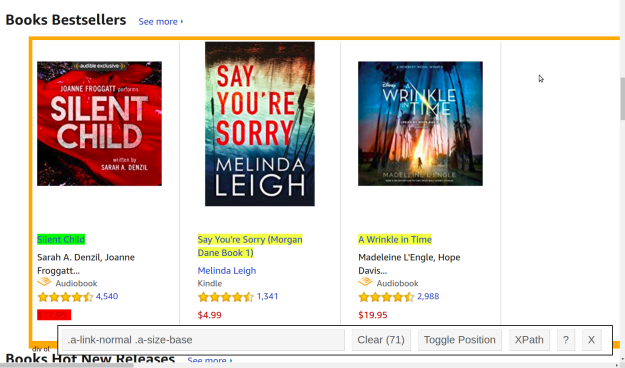
We now need to specifically harvest the titles from the webpage as this is one of our goals. There are at least two ways to do this. If you are an expert in HTML you can find the information by inspecting the page’s HTML. Another way is to the selectorGadget extension available in Chrome. When using this extension you simply click on the information you want to inspect and it gives you the CSS selector for that particular element. This is shown below
1.png

The green highlight is the CSS selector that you clicked on. The yellow represents all other elements that have the same CSS selector. The red represents what you do not want to be included. In this picture, I do not want the price because I want to scrape this separately.

Once you find your information you want to copy the CSS element information in the bar at the bottom of the picture. This information is then pasted into R and use the “html_nodes” function to pull this specific information from the webpage.

bookTitle<- html_nodes(webpage,'.a-link-normal .a-size-base')

We now need to convert this information to text and we are done.

title <- html_text(bookTitle, trim = TRUE) 

Next, we repeat this process for the price.

bookPrice<- html_nodes(webpage,'.acs_product-price__buying')
price <- html_text(bookPrice, trim = TRUE) 

Lastly, we make our data frame with all of our information.

books<-as.data.frame(title)
books$price<-price

With this done we can do basic statistical analysis such as the mean, standard deviation, histogram, etc. This was not a complex example but the basics of pulling data was provided. Below is what the first few entries of the data frame look like.

head(books)
##                                   title  price
## 1                          Silent Child $17.95
## 2 Say You're Sorry (Morgan Dane Book 1)  $4.99
## 3                     A Wrinkle in Time $19.95
## 4                       The Whiskey Sea  $3.99
## 5            Speaking in Bones: A Novel  $2.99
## 6 Harry Potter and the Sorcerer's Stone  $8.99

Conclusion

Web scraping using automated tools saves time and increases the possibilities of data analysis. The most important thing to remember is to understand what exactly it is you want to know. Otherwise, you will quickly become lost due to the overwhelming amounts of available information.

Line Breaks and Justification in LaTeX

In this post, we will look at line breaks and justification in LaTeX. These tools will provide a user with more nuanced command of their document.

Paragraph Break

By leaving a space between paragraphs in your document LaTeX will start a new paragraph. Below is the code followed by the output.

\documentclass{article}
\begin{document}
Hello, here is some text without a meaning. This text should show what a printed text will look like at this place. If you read this text, you will get no information.

Really?

Is there no information?

Is there a difference between this text and some nonsense like “Huardest gefburn”?

Kjift – not at all!

A blind text like this gives you information about the selected font.
\end{document}

1.png

Notice how each paragraph is indented. This is the default setting in LaTex. To remove indentation you need to use the “\noindet” declaration as shown below.

\documentclass{article}
\begin{document}
Hello, here is some text without a meaning. This text should show what a printed text will look like at this place. If you read this text, you will get no information.

\noindent

Really?
\noindent

Is there no information?
\noindent

Is there a difference between this text and some nonsense like “Huardest gefburn”?
\noindent

Kjift – not at all!
\noindent

A blind text like this gives you information about the selected font.
\end{document}

1.png

In this example, only the first paragraph is indented.

A simpler way to do this is with the short command line break \\. Below is what it looks like

\documentclass{article}
\begin{document}
Hello, here is some text without a meaning. This text should show what a printed text will look like at this place. If you read this text, you will get no information.\\
Really?\\
Is there no information? \\
Is there a difference between this text and some nonsense like “Huardest gefburn”? \\
Kjift – not at all! \\
A blind text like this gives you information about the selected font.
\end{document}

1

You can see that both “\noindent” and the short command \\ get the same results. However, the latter is probably more efficient and perhaps easier to read.

Justification

There are also ways to remove the default setting for justification. The three declaration are “\raggedright”, “\raggedleft”, and “\centering”. The “\raggedright” declaration makes the right side of the page ragged while the left side of the page is justified as shown below.

\documentclass{article}
\usepackage[english]{babel}
\usepackage{blindtext}
\begin{document}
{\raggedright
\Blindtext}
\end{document}

1.png

You can clearly see how the right side is truly ragged. The other packages in the code create the demo paragraph automatically for us.

The “\raggedleft” declaration does the opposite. See below

\documentclass{article}
\usepackage[english]{babel}
\usepackage{blindtext}
\begin{document}
{\raggedleft
\Blindtext}
\end{document}

1.png

I think we already know what centering does.

\documentclass{article} 
\usepackage[english]{babel} 
\usepackage{blindtext} 
\begin{document} 
{\centering 
\Blindtext} 
\end{document}

1.png

Conclusion

This post provided a demonstration of line breaks and justification in LaTeX.

Review of “The Titanic: Lost…and Found”

This post is a review of the book The Titanic: Lost and Found (Step-Into-Reading, Step 4) by Judy Donnelly (pp. 48).

The Summary

This text covers the classic story of the sinking of the Titanic in the early part of the 20th century. Originally build as unsinkable the Titanic collided with an iceberg and sank on its first voyage from Europe to America.

The text describes the accommodations and size of the ship. Such amenities as a pool and dining halls are depicted. At the time, the Titanic was also the largest passenger ship ever built.

When the ship had its incident with the iceberg people were supposedly laughing and joking as they were called to the deck for evacuation. This is actually an emotionally poweful moment in the text that a small child will miss. The people actually believed the foolish claim that a ship was unsinkable. To make matters worse, there were not enough lifeboats as even the builders of the ship arrogantly believed this as well.

Adding to the discouragement was the fact that a nearby ship ignored the radio calls of the sinking Titanic because their radio was turned off. When the people finally began to realize the danger they were in fear quickly set in. For whatever reason, the musicians continue to play music to try and keep the people calm and even played a hymn right before the final sinking of the ship. A somewhat chilling ending.

The book then concludes with the people in the lifeboat being rescued, it mentions changes to laws to prevent this disaster from happening again, and the final section of the text shares the story of how the Titanic was found in the 1980’s by researchers.

The Good

This book is written in simple language for small children. It can be read by early primary students. This text also provides a good introduction into one of the great tragedies of modern western history.

The illustrations also help to describe what is happening in the text. Lastly, the text is not that long and probably can be read in a few days by a child alone.

The Bad

There is little to complain about with this text. It should be in any primary teacher’s library. The only problem may be that it is a paperback book so it will not last long enduring the wear and tear that comes from small children.

The Recommendation

There will be no regrets if you purchase this book for your classroom or home.

Absolute Value Equations & Inequalities

The absolute value of a number is its distance from 0.  For example, 5 and -5 both have an absolute value of 5 because both are 5 units from 0. The symbols used for absolute value are |  | with a number or variable placed inside the vertical bars. With this knowledge lets look at an example of an absolute value.

1.png

The answer is +5 because both 5 and -5 are 5 units from 0.

In this post, we will look at equations and inequalities that use absolute values.

Solving one Absolute Value Equations

It is also possible to have inequalities with absolute values. To solve these you want to isolate the absolute value and solve the positive and also the negative version of the answer. Lastly, you never manipulate anything inside the absolute value brackets. you only manipulate and simplify values outside of the brackets. Below is an example.

1.png

As you can see absolute value inequalities involves solving two equations. Below is an example involving multiplication.

1

Notice again how the values inside the absolute value were never changed. This is important when solving absolute value inequalities.

Solving Two Absolute Values Equations

Solving two absolute values is not that difficult. You simply make one of the absolute values negative for one equation and positive for another. Below is an example.

1.png

Absolute Value Inequalities

Absolute value inequalities require a slightly different approach. You can rewrite the inequality in double inequality form and solve appropriately when the inequality is “less than.” Below is an example.

1.png

You can see that we put the absolute value in the middle and simply solved for x. you can even write this using interval notation as shown below.

1

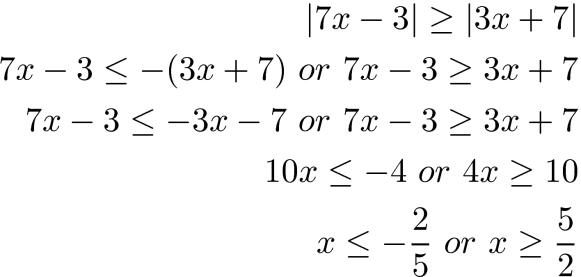
“Greater than” inequalities are solved the same as inequalities with equal signs. You use the “or” concept to solve both inequalities.

1.png

The interval notation is as follows

1

We use the union sign in the middle is used in place of the word “or”.

Conclusion 

This post provided a brief overview of how to deal with absolute values in both equations and inequalities.

Modifying Text and Creating Commands in LaTeX

In this post, we are going to explore to separate features available in LaTeX. These two features are modifying the text size and creating custom commands.

Modifying Text

You can change the size and shape of text using many different declarations/environments in LaTeX. Declarations and environments serve the same purpose the difference is in the readability of the code. In the example below, we use an environment to make the text bigger than normal. The code is first followed by the example

\documentclass{article}
\usepackage[english]{babel}
\usepackage{blindtext}
\begin{document}
\begin{huge}
\blindtext
\end{huge}
\end{document}

1.png

Here is what we did.

  1. We create a document with the class of article
  2. We used the “babel” and “blindtext” packages to create some filler text.
  3. Next, we began the document
  4. We create the environment “huge” for enlarging the text.
  5. We used the declaration  “\blindtext” to create the paragraph
  6. We closed the “huge” environment with the “end” declaration
  7. We end the document

If you ran this code you will notice the size of the text is larger than normal. Of course, you can bold and do many more complex things to the text simultaneously. Below is the same example but with the text bold and in italics

\documentclass{article}
\usepackage[english]{babel}
\usepackage{blindtext}
\begin{document}
\begin{huge}
\bfseries
\textit
\blindtext
\end{huge}
\end{document}

1.png

The code is mostly the same with the addition of “\bfseries” for bold and  “\texit” for italics.

Making Commands

It is also possible to make custom commands in LaTeX. This can save a lot of time for repetitive practices. In the example below, we create a command to automatically print the name of this blog’s web address.

\documentclass{article}
\newcommand{\ert}{\bfseries{educationalresearchtechniques}}
\begin{document}
The coolest blog on the web is \ert
\end{document}

1.png

In the code, we use the declaration “\newcommand” in the preamble. This declaration had the command “\ert” which is the shorthand for the code to the right which is “\bfseries{educationalresearchtechniques}. This code tells LaTeX to bold the contents inside the brackets.

The next step was to begin the document. Notice how we used the “\ert” declaration and the entire word educationalresearchtechniques was printed in bold in the actual pdf.

It is also possible to make commands that format text. Below is an example.

\documentclass{article}
\newcommand{\mod}[1]{\textbf{\textit{#1}}}
\begin{document}
The is an example of modified \mod{text}
\end{document}

1.png

What is new is in line 2. Here we use the “\newcommand” declaration again but this time we create a command call “\mode” and give it an argument of 1 (see [1]) this is more important when you have more than one argument. Next, we put in curly brackets what we want to be done to the text. Here we want the text to be bold “\textbf” and in italics “\textit”. Lastly, we set the definition {#1}. Definition works with arguments in that argument 1 uses definition 1, argument 2 uses definition 2, etc.  Having more than one argument and definition can be confusing for beginners so this will not be explored for now.

Conclusion

This post provided assistance in understanding LaTeX’s font size capabilities as well as ways to make new commands.

Review of “Peter the Great”

In this post, we will take a look at the book Peter the Great by Diane Stanley (32 pp).

The Summary
This book covers the life and death of Peter the Great (1672-1725) one of the most influential Tsars of Russia. The book begins by showing Peter as small boy play war games with his friends. What is unique is that Peter is not the leader, despite his status, but is rather one of the junior soldiers taking orders from the other boys. This points already to an everyman personality of Peter.

The story does not neglect that Peter was royalty and shows some of the luxuries Peter enjoyed such as dancing animals and his own horses. Peter even designed and sailed his own ships.

As a student, Peter was educated by Europeans. He saw how they lived compared to how people in his country lived and it planted a seed for reformation in Peter’s heart.

I his early twenties Peter travels to Europe. While there he absorbs as much culture about Europe as possible and focuses heavily on learning various trades such as shipbuilding. His status as a King made it difficult to learn trades as people found this strange of someone of his rank.

Upon returning home, Peter began immediately to reform Russia. Immediately the long beards that Russian men favored were removed at least among the elite. In addition, the long robes were shortened. Men and women were encouraged to mingle at social settings and arranged marriages were discouraged.

Peter also built schools and canals. His greatest achievement may have been the founding and building of St. Petersburg. Today St. Petersburg is one of the largest cities in Russia.

Of course, all of these reforms had drawbacks. The poor were tax practically to death. Everything was taxed from candle to beards. Peasant young men had to spend as much as 25 years in the military. Lastly, thousands perhaps tens of thousands lost there lives in wars and building projects push by Peter.

Peter died in 1725 of a fever. He was 53 years old at the time of his death.

The Good
This book was extremely interesting. It captures your attention by giving with the rich illustration that has a renaissance feel to it. The illustrations always depict Peter as a man of action. The text is well-written and simple enough for an upper elementary student to understand and appreciate by themselves.

The Bad
There is little to complain about. This text is well-balanced between picture and text. Younger students (below grade 4) may need help with the text. Otherwise, this book is great for all kids and provides some understanding of the history of Russia.

The Recommendation
This is an excellent book to add ou your library as teacher or parent. Younger kids can enjoy the pictures while older kids can enjoy the text. Even an adult can benefit from reading this book if they have not been exposed to Russian history.

Solving Compound Inequalities

Compound inequalities are two inequalities that are joined by the word “and” or the word “or”. Solving a compound inequality means finding all values that make the compound inequality true.

For compound inequalities join ed by the word “and” we look for solutions that are true for both inequalities. Fo compound inequalities joined by the word “or” we look for solutions that work for either inequality.

It is also possible to graph compound inequalities on a number line as well as indicate the final answer using interval notation. Below is a compound inequality with the line graph solution

1.png

Solving the answer is the same as a regular equation. Below is the number line for this answer.

1.png

The empty circle at -8 means that -8 is not part of the solution. This means all values less than -8 are acceptable answers. This is why the line moves from right to left. All values less than -8 until infinity are acceptable answers. Below is the interval notation.

1

The parentheses mean that the value next to it is not included as a solution. This corresponds to the empty circle over the -8 in the lin graph. If the value should be included such as with a less/greater than sign you would use a bracket.

Double Inequality

A double inequality is a more concise version of a compound inequality. The goal is to isolate the variable in the middle. Below is an example

1.png

This is not complex. We simply isolate x in the middle using appropriate steps. The number line and interval notation or as follows

1.png

[-4, 2/3)

This time there is a bracket next to -4 which means that -4 is also a potential solution. In addition, notice how the -4 has a filled circle on the number line. This is another indication that -4 is a solution.

Practical Application

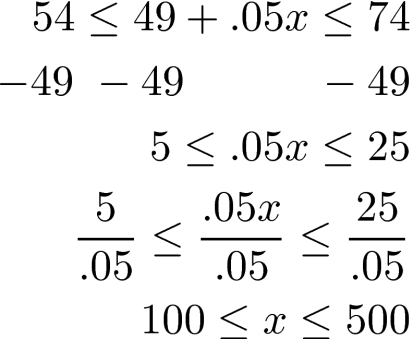
You have signed up for internet access through your cell phone. Your bill is a flat $49.00 per month please $0.05 per minute for internet use. How many minutes can you use internet per month if you want to keep your bill somewhere between $54-$74 per month?

Below is the solution using a double inequality

1

The answer indicates that you can spend anywhere from 100 to 500 minutes on the internet through your phone per month to stay within the budget. You can make the number line and develop the interval notation yourself.

Conclusion

Compound inequalities are useful for not only as an intellectual exercise. They can also be used to determine practical solutions that include more than one specific answer.

Benefits of Coding in Schools

There is a push in education to have more students learn to code. In fact, some schools are considering having computer coding count as the foreign language requirement to graduate from high school. This in many ways almost singles that coding has “arrived” and is not a legitimate subject not just for the computer nerd but for everybody.

In this post, we will look at several benefits of learning to code while in school.

Problem-Solving

People often code to solve a problem. It can be something as small as making an entertaining game or to try and get the computer to do something.  Generally, the process of developing code leads to all kinds of small problems that have to be solved along the way. For example, you want the code to A but instead, it does B. This leads to all kinds of google searches and asking around to try and get the code to do what you want.

All this is happening in the context in which the student is truly motivated to learn. This is perhaps no better situation in which problem-solving skills are developed.

Attention to Detail

Coding involves the ability to see the smallest details. I cannot remember how many times my code would not run because I forgot a comma or a semicolon or perhaps I misspelled a variable. These problems are small but they must be noticed in order to get the code to run.

When students develop code they must write the code perfect (not necessarily efficiently) in order for it to work. This attention to the small things helps in developing students who are not careless.

Computational Thinking

Computational thinking is the skill of being able to explain systematically what you are doing. When developing code students must be able to capture every step needed to execute an action in their code. It is not possible to skip steps. Everything must be planned for in order to have success.

This type of thinking carries over into the real world when communicating with people. The computational thinking comes out when presenting information, teaching, etc. This logical thinking is a key skill in today’s world where miscommunication is becoming so common.

Employment Opportunities

Naturally, learning to code can lead to employment opportunities. There is a growing demand for people with coding skills. Some of the strongest demands are in fields such as Data Science in which people need a blend of coding and domain expertise to develop powerful insights. In other words, it is better to be well-rounded rather than a super coder for the average person as the domain knowledge is useful in interpreting whatever results the coding helped to produce.

Conclusion

There are naturally other benefits of coding as well. The purpose here was just to consider a few reasons. As a minimum, learning to code should be experienced by most students just as they are exposed to music appreciation, art appreciation, and other subjects for the sake of exposure.

Writing Discussion & Conclusions in Research

The Discussion & Conclusion section of a research article/thesis/dissertation is probably the trickiest part of a project to write. Unlike the other parts of a paper, the Discussion & Conclusions are hard to plan in advance as it depends on the results. In addition, since this is the end of a paper the writer is often excited and wants to finish it quickly, which can lead to superficial analysis.

This post will discuss common components of the Discussion & Conclusion section of a paper. Not all disciplines have all of these components nor do they use the same terms as the ones mentioned below.

Discussion

The discussion is often a summary of the findings of a paper. For a thesis/dissertation, you would provide the purpose of the study again but you probably would not need to share this in a short article. In addition, you also provide highlights of what you learn with interpretation. In the results section of a paper, you simply state the statistical results. In the discussion section, you can now explain what those results mean for the average person.

The ordering of the summary matters as well. Some recommend that you go from the most important finding to the least important. Personally, I prefer to share the findings by the order in which the research questions are presented. This maintains a cohesiveness across sections of a paper that a reader can appreciate. However, there is nothing superior to either approach. Just remember to connect the findings with the purpose of the study as this helps to connect the themes of the paper together.

What really makes this a discussion is to compare/contrast your results with the results of other studies and to explain why the results are similar and or different. You also can consider how your results extend the works of other writers. This takes a great deal of critical thinking and familiarity with the relevant literature.

Recommendation/Implications

The next component of this final section of the paper is either recommendations or implications but almost never both. Recommendations are practical ways to apply the results of this study through action. For example, if your study finds that sleeping 8 hours a night improves test scores then the recommendation would be that students should sleep 8 hours a night to improve their test scores. This is not an amazing insight but the recommendations must be grounded in the results and not just opinion.

Implications, on the other hand, explain why the results are important. Implications are often more theoretical in nature and lack the application of recommendations. Often implications are used when it is not possible to provide a strong recommendation.

The terms conclusion and implications are often used interchangeably in different disciplines and this is highly confusing. Therefore, keep in mind your own academic background when considering what these terms mean.

There is one type of recommendation that is almost always present in a study and that is recommendations for further study. This is self-explanatory but recommendations for further study are especially important if the results are preliminary in nature. A common way to recommend further studies is to deal with inconclusive results in the current study. In other words, if something weird happened in your current paper or if something surprised you this could be studied in the future. Another term for this is “suggestions for further research.”

Limitations

Limitations involve discussing some of the weaknesses of your paper. There is always some sort of weakness with a sampling method, statistical analysis, measurement, data collection etc. This section is an opportunity to confess these problems in a transparent matter that further researchers may want to control for.

Conclusion

Finally, the conclusion of the Discussion & Conclusion is where you try to summarize the results in a sentence or two and connect them with the purpose of the study. In other words, trying to shrink the study down to a one-liner. If this sounds repetitive it is and often the conclusion just repeats parts of the discussion.

Blog Conclusion

This post provides an overview of writing the final section of a research paper. The explanation here provides just one view on how to do this. Every discipline and every researcher has there own view on how to construct this section of a paper.

Time Mangagement and E-Learning

Time management is a critical component of having success when studying online. However, many people struggle with the discipline to manage their time so that they can complete an online learning experience. In this post, we will look at several strategies that can help a student to complete an online course.
Routine is King

Perhaps the single most valuable piece of advice that can be given is the benefit of routine. Routine is as simple as dedicating a certain time of each day to the class. Routine can also manifest itself through setting aside a designated place for studying as well.  The beauty of a schedule is that you have taken control of what you will do during a given day.

It is important that a student has a dedicated place and time for e-learning studies. Even though e-learning can happen anywhere few people can learn anywhere as they must be in a learning mindset first. Often, the mindset to learn is dependent on the environment which the student needs to control.

One Thing at a Time

Multi-tasking is tempting but does not work. This is an extra special problem for e-learning because a student is on their computer. Being on the computer can allow the student to check emails, chat on facebook, listen to music, while they are also supposed to be learning.

These other activities are only distractions when trying to learning content online. As such, it is important to close these other applications and turn off notifications from various websites when really trying to learn online.

Ask for Help

Elearning can be an isolating experience. A student is all alone trying to maneuver the complexities of a subject. At times, a student may even get stuck and not know what to do.

In such situations, it is important that a student reaches out to a peer or the teacher for support. The feedback that is received can make a difference in completing a course or not.

Something that was alluded to in this section is the benefit of taking an online course with a friend. Having a friend in a course can be a source of encouragement and also a way to share the burden of larger assignments.

Conclusion

The anytime anywhere freedom of e-learning is perhaps the greatest blessing and also the greatest curse of this platform. The flexibility gives people the impression they can study whenever. However, when there is no structure to the learning experience there is usually no progress made either. Therefore, each student must put in constraints in order to function at a high level academically when studying online.

Major Challenges of Teachers

This post will provide some examples of common problems teachers face. Although the post may seem overwhelmingly negative the purpose here is to provide insight into the actual realities of teaching rather than the romantic experience portrayed in many venues.

Adminstration

Administrators are in charge of the “big picture” of guiding a school towards particular goals that are often laid out by local laws and the results of the prior accreditation visit. This focus on large institutional goals can often cause the administrator to lose sight of the needs of the teachers (unless this was a recommendation from the last accreditation visit),

What results is a task-oriented leadership that is focused on attaining goals or at least showing progress towards goals. This can lead administrators to step on, overwork, and even mistreat teachers. It is hard to blame administrators because if they do not meet specific targets they could lose their own employment.

The constant meetings and incredulous policies that are derived to “help the students” can become exceedingly frustrating for any teacher. Rest assure that few administrators just randomly think up bad ideas. Often the inspiration is from a higher source that is abusing the local administrator.

Co-Workers

There is a surprising amount of petty bickering and fighting among teachers that can become Machevellini in nature. Gossiping backbiting and of course backstabbing all take place. A teacher A confides in teacher B there having problems handling their students and teacher B spreads this to everyone on-campus that teacher A is a terrible teacher who cannot handle her duties.

I’ve heard of teachers complaining that other teachers do not collaborate during lunch with them as though lunchtime is meant to be a meeting that has required attendance. In another setting, I’ve seen teachers slander another teacher in order to help a friend get the job. Petty jealousy can lead teachers to isolate themselves to avoid political attacks which makes it harder to support students.

Parents & Students

Perhaps the biggest problem facing teachers is not necessarily students but parents. If a child is out of line it should only take a simple phone call home to resolve the problem. However, this is almost never the case. Today many parents are indifferent to the behavior of their children. This leaves the teacher only to provide intervention towards a wayward student.

The other extreme is the parent who overly protects and defends everything their child does. This undercuts the teacher’s authority in the same way as a parent who does not provide any sort of behavioral support. The same parents are often quick to get the attention of the administration which is always.

Class Administration

There are a bevy of things that a teacher must do in their own classroom such as

  • Class preparation
  • Marking assignments
  • Decorating
  • Meetings
  • Communicating with parents/students
  • Professional development

This all requires serious time management. It is hard to stay on top of all of these expectations if you are laid back and easy going. It requires strict discipline in order to keep some sort of sanity.

Conclusion

Teaching is tough. However, it is not all bad. There are many rewarding moments in being a teacher. Yet to be successful a teacher must be aware of the common problems that will face so that they are able to weather them.