Category Archives: Research

Using Regression for Prediction in R

Advertisements

In the last post about R, we looked at plotting information to make predictions. We will now look at an example of making predictions using regression.

We will use the same data as last time with the help of the ‘caret’ package as well. The code below sets up the seed and the training and testing set we need.

> library(caret); library(ISLR); library(ggplot2)
> data("College");set.seed(1)
> PracticeSet<-createDataPartition(y=College$Grad.Rate,  +                                  p=0.5, list=FALSE) > TrainingSet<-College[PracticeSet, ]; TestingSet<- +         College[-PracticeSet, ] > head(TrainingSet)

The code above should look familiar from the previous post.

Make the Scatterplot

We will now create the scatterplot showing the relationship between “S.F. Ratio” and “Grad.Rate” with the code below and the scatterplot.

> plot(TrainingSet$S.F.Ratio, TrainingSet$Grad.Rate, pch=5, col="green", 
xlab="Student Faculty Ratio", ylab="Graduation Rate")

Rplot10

Here is what we did

  1. We used the ‘plot’ function to make this scatterplot. The x variable was ‘S.F.Ratio’ of the ‘TrainingSet’ the y variable was ‘Grad.Rate’.
  2. We picked the type of dot to use using the ‘pch’ argument and choosing ’19’
  3. Next, we chose a color and labeled each axis

Fitting the Model

We will now develop the linear model. This model will help us to predict future models. Furthermore, we will compare the model of the Training Set with the Test Set. Below is the code for developing the model.

> TrainingModel<-lm(Grad.Rate~S.F.Ratio, data=TrainingSet)
> summary(TrainingModel)

How to interpret this information was presented in a previous post. However, to summarize, we can say that when the student to faculty ratio increases one the graduation rate decreases 1.29. In other words, an increase in the student to faculty ratio leads to decrease in the graduation rate.

Adding the Regression Line to the Plot

Below is the code for adding the regression line followed by the scatterplot

> plot(TrainingSet$S.F.Ratio, TrainingSet$Grad.Rate, pch=19, col="green", xlab="Student Faculty Ratio", ylab="Graduation Rate")
> lines(TrainingSet$S.F.Ratio, TrainingModel$fitted, lwd=3)

Predicting New Values

With our model complete we can now predict values. For our example, we will only predict one value. We want to know what the graduation rate would be if we have a student to faculty ratio of 33. Below is the code for this with the answer

> newdata<-data.frame(S.F.Ratio=33)
> predict(TrainingModel, newdata)
      1 
40.6811

Here is what we did

  1. We made a variable called ‘newdata’ and stored a data frame in it with a variable called ‘S.F.Ratio’ with a value of 33. This is x value
  2. Next, we used the ‘predict’ function from the ‘caret’ package to determine what the graduation rate would be if the student to faculty ratio is 33. To do this we told caret to use the ‘TrainingModel’ we developed using regression and to run this model with the information in the ‘newdata’ dataframe
  3. The answer was 40.68. This means that if the student to faculty ratio is 33 at a university then the graduation rate would be about 41%.

Testing the Model

We will now test the model we made with the training set with the testing set. First, we will make a visual of both models by using the “plot” function. Below is the code follow by the plots.

par(mfrow=c(1,2))
plot(TrainingSet$S.F.Ratio,
TrainingSet$Grad.Rate, pch=19, col=’green’,  xlab=”Student Faculty Ratio”, ylab=’Graduation Rate’)
lines(TrainingSet$S.F.Ratio,  predict(TrainingModel), lwd=3)
plot(TestingSet$S.F.Ratio,  TestingSet$Grad.Rate, pch=19, col=’purple’,
xlab=”Student Faculty Ratio”, ylab=’Graduation Rate’)
lines(TestingSet$S.F.Ratio,  predict(TrainingModel, newdata = TestingSet),lwd=3)

In the code, all that is new is the “par” function which allows us to see to plots at the same time. We also used the ‘predict’ function to set the plots. As you can see, the two plots are somewhat differ based on a visual inspection. To determine how much so, we need to calculate the error. This is done through computing the root mean square error as shown below.

> sqrt(sum((TrainingModel$fitted-TrainingSet$Grad.Rate)^2))
[1] 328.9992
> sqrt(sum((predict(TrainingModel, newdata=TestingSet)-TestingSet$Grad.Rate)^2))
[1] 315.0409

The main take away from this complicated calculation is the number 328.9992 and 315.0409. These numbers tell you the amount of error in the training model and testing model. The lower the number the better the model. Since the error number in the testing set is lower than the training set we know that our model actually improves when using the testing set. This means that our model is beneficial in assessing graduation rates. If there were problems we may consider using other variables in the model.

Conclusion

This post shared ways to develop a regression model for the purpose of prediction and for model testing.

Traits of Grounded Theory: Process, Sampling, & Comparision

Advertisements

In this post, we will look at some of the traits of grounded theory regardless of the design that is used by a researcher. Generally, there are six core traits of grounded theory and they are

  • Process approach
  • Theoretical sampling
  • Constant comparison
  • Core category
  • Generation of theory
  • Memos

We will only look at the first three in this post and save the rest for a future discussion.

Process Approach

A core trait of grounded theory is its use to examine a process. A process is a sequence of actions among people. As a grounded theory research breaks down the process into steps, these steps become know as categories. The categories can be further broken down into codes.

For example, let’s say a teacher wants to develop a grounded theory about the “process of dropping out of college.” Such a study would involve describing the steps that lead a person to dropout of college. The various steps in this process would come from interviewing students who dropout of college to determine the order of events the precipitated dropout.

Theoretical Sampling

Theoretical sampling involves selecting data to collect based on its use in developing a theory. A grounded theory researcher is always seeking to find data that would be useful in the continual development of a theory.

Returning to our dropout example, a grounded theorist may choose to collect data from student dropouts, teachers, and parents. The reason for selecting these participants is that the researcher may be convinced that these participants have useful information in developing a theory.

It is important to use theoretical sampling while the theory emerges. A grounded theory researcher is constantly collecting and analyzing data simultaneously. This process is mutually beneficial because the sampling helps the analysis while the analysis helps to focus the sampling.

Data collection does not stop until the data becomes saturated. Saturation is the point that new data will not provide any additional information. At what point this happens is at the discretion of the researcher.

Constant Comparison

As information is coded and then put into categories, new information is compared to existing codes and categories. This is a constant comparison. By comparing information constantly it allows for new codes and categories to emerge if current ones do not fit new data. In addition, codes and or categories that were separate may be combined as the data indicates.

Conclusion

Grounded theory involves looking at and describing processes by employing theoretical sampling and constant comparison. These are just some of the characteristics of grounded theory

Using Plots for Prediction in R

Advertisements

It is common in machine learning to look at the training set of your data visually. This helps you to decide what to do as you begin to build your model.  In this post, we will make several different visual representations of data using datasets available in several R packages.

We are going to explore data in the “College” dataset in the “ISLR” package. If you have not done so already, you need to download the “ISLR” package along with “ggplot2” and the “caret” package.

Once these packages are installed in R you want to look at a summary of the variables use the summary function as shown below.

summary(College)

You should get a printout of information about 18 different variables. Based on this printout, we want to explore the relationship between graduation rate “Grad.Rate” and student to faculty ratio “S.F.Ratio”. This is the objective of this post.

Next, we need to create a training and testing dataset below is the code to do this.

> library(ISLR);library(ggplot2);library(caret)
> data("College")
> PracticeSet<-createDataPartition(y=College$Enroll, p=0.7, +                                  list=FALSE) > trainingSet<-College[PracticeSet,] > testSet<-College[-PracticeSet,] > dim(trainingSet); dim(testSet)
[1] 545  18
[1] 232  18

The explanation behind this code was covered in predicting with caret so we will not explain it again. You just need to know that the dataset you will use for the rest of this post is called “trainingSet”.

Developing a Plot

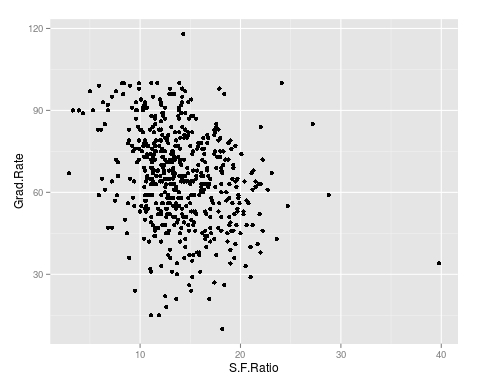
We now want to explore the relationship between graduation rates and student to faculty ratio. We will be used the ‘ggpolt2’  package to do this. Below is the code for this followed by the plot.

qplot(S.F.Ratio, Grad.Rate, data=trainingSet)

As you can see, there appears to be a negative relationship between student faculty ratio and grad rate. In other words, as the ration of student to faculty increases there is a decrease in the graduation rate.

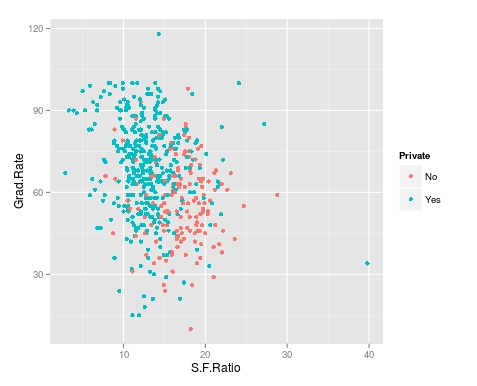
Next, we will color the plots on the graph based on whether they are a public or private university to get a better understanding of the data. Below is the code for this followed by the plot.

> qplot(S.F.Ratio, Grad.Rate, colour = Private, data=trainingSet)

It appears that private colleges usually have lower student to faculty ratios and also higher graduation rates than public colleges

Add Regression Line

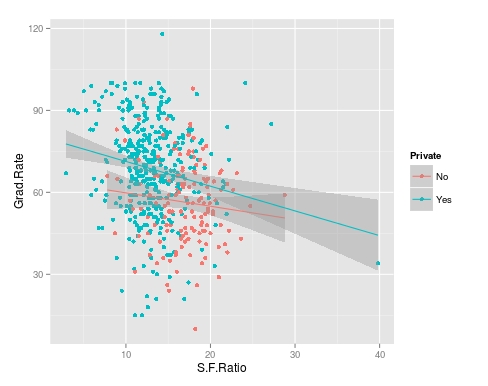
We will now plot the same data but will add a regression line. This will provide us with a visual of the slope. Below is the code followed by the plot.

> collegeplot<-qplot(S.F.Ratio, Grad.Rate, colour = Private, data=trainingSet) > collegeplot+geom_smooth(method = ‘lm’,formula=y~x)

Most of this code should be familiar to you. We saved the plot as the variable ‘collegeplot’. In the second line of code, we add specific coding for ‘ggplot2’ to add the regression line. ‘lm’ means linear model and formula is for creating the regression.

Cutting the Data

We will now divide the data based on the student-faculty ratio into three equal size groups to look for additional trends. To do this you need the “Hmisc” packaged. Below is the code followed by the table

> library(Hmisc)
> divide_College<-cut2(trainingSet$S.F.Ratio, g=3)
> table(divide_College)
divide_College
[ 2.9,12.3) [12.3,15.2) [15.2,39.8] 
        185         179         181

Our data is now divided into three equal sizes.

Box Plots

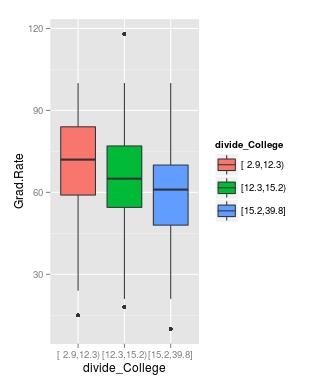
Lastly, we will make a box plot with our three equal size groups based on student-faculty ratio. Below is the code followed by the box plot

CollegeBP<-qplot(divide_College, Grad.Rate, data=trainingSet, fill=divide_College, geom=c(“boxplot”)) > CollegeBP

As you can see, the negative relationship continues even when student-faculty is divided into three equally size groups. However, our information about private and public college is missing. To fix this we need to make a table as shown in the code below.

> CollegeTable<-table(divide_College, trainingSet$Private)
> CollegeTable
              
divide_College  No Yes
   [ 2.9,12.3)  14 171
   [12.3,15.2)  27 152
   [15.2,39.8] 106  75

This table tells you how many public and private colleges there based on the division of the student-faculty ratio into three groups. We can also get proportions by using the following

> prop.table(CollegeTable, 1)
              
divide_College         No        Yes
   [ 2.9,12.3) 0.07567568 0.92432432
   [12.3,15.2) 0.15083799 0.84916201
   [15.2,39.8] 0.58563536 0.41436464

In this post, we found that there is a negative relationship between student-faculty ratio and graduation rate. We also found that private colleges have a lower student-faculty ratio and a higher graduation rate than public colleges. In other words, the status of a university as public or private moderates the relationship between student-faculty ratio and graduation rate.

You can probably tell by now that R can be a lot of fun with some basic knowledge of coding.

Predicting with Caret

Advertisements

In this post, we will explore the use of the caret package for developing algorithms for use in machine learning. The caret package is particularly useful for processing data before the actual analysis of the algorithm.

When developing algorithms is common practice to divide the data into a training a testing subsamples. The training subsample is what is used to develop the algorithm while the testing sample is used to assess the predictive power of the algorithm. There are many different ways to divide a sample into a testing and training set and one of the main benefits of the “caret” package is in dividing the sample.

In the example we will use, we will return to the “kearnlab” example and this develop an algorithm after sub-setting the sample to have a training data set and a testing data set.

First, you need to download the ‘caret’ and ‘kearnlab’ package if you have not done so. After that below is the code for subsetting the ‘spam’ data from the ‘kearnlab’ package.

inTrain<- createDataPartition(y=spam$type, p=0.75, 
list=FALSE)
training<-spam[inTrain,]
testing<-spam[-inTrain,] 
dim(training)

Here is what we did

  1. We created the variable ‘inTrain’
  2. In the variable ‘inTrain’ we told R to make a partition in the data use the ‘createDataPartition’ function. I the parenthesis we told r to look at the dataset ‘spam’ and to examine the variable ‘type’. Then we told are to pull 75% of the data in ‘type’ and copy it to the ‘inTrain’ variable we created. List = False tells R not to make a list. If you look closely, you will see that the variable ‘type’ is being set as the y variable in the ‘inTrain’ data set. This means that all the other variables in the data set will be used as predictors. Also, remember that the ‘type’ variable has two outcomes “spam” or “nonspam”
  3. Next, we created the variable ‘training’ which is the dataset we will use for developing our algorithm. To make this we take the original ‘spam’ data and subset the ‘inTrain’ partition. Now all the data that is in the ‘inTrain’ partition is now in the ‘training’ variable.
  4. Finally, we create the ‘testing’ variable which will be used for testing the algorithm. To make this variable, we tell R to take everything that was not assigned to the ‘inTrain’ variable and put it into the ‘testing’ variable. This is done through the use of a negative sign
  5. The ‘dim’ function just tells us how many rows and columns we have as shown below.
[1] 3451   58

As you can see, we have 3451 rows and 58 columns. Rows are for different observations and columns are for the variables in the data set.

Now to make the model. We are going to bootstrap our sample. Bootstrapping involves random sampling from the sample with replacement in order to assess the stability of the results. Below is the code for the bootstrap and model development followed by an explanation.

set.seed(32343)
SpamModel<-train(type ~., data=training, method="glm")
SpamModel

Here is what we did,

  1. Whenever you bootstrap, it is wise to set the seed. This allows you to reproduce the same results each time. For us, we set the seed to 32343
  2. Next, we developed the actual model. We gave the model the name “SpamModel” we used the ‘train’ function. Inside the parenthesis, we tell r to set “type” as the y variable and then use ~. which is a shorthand for using all other variables in the model as predictor variables. Then we set the data to the ‘training’ data set and indicate that the method is ‘glm’ which means generalized linear model.
  3. The output for the analysis is available at the link SpamModel

There is a lot of information but the most important information for us is the accuracy of the model which is 91.3%. The kappa stat tells us what the expected accuracy of the model is which is 81.7%. This means that our model is a little bit better than the expected accuracy.

For our final trick, we will develop a confusion matrix to assess the accuracy of our model using the ‘testing’ sample we made earlier. Below is the code

SpamPredict<-predict(SpamModel, newdata=testing)
confusionMatrix(SpamPredict, testing$type)

Here is what we did,

  1. We made a variable called ‘SpamPredict’. We use the function ‘predict’ using the ‘SpamModel’ with the new data called ‘testing’.
  2. Next, we make matrix using the ‘confusionMatrix’ function using the new model ‘SpamPredict’ based on the ‘testing’ data on the ‘type’ variable. Below is the output

Reference

  1. Prediction nonspam spam
       nonspam     657   35
       spam         40  418
                                              
                   Accuracy : 0.9348          
                     95% CI : (0.9189, 0.9484)
        No Information Rate : 0.6061          
        P-Value [Acc > NIR] : <2e-16          
                                              
                      Kappa : 0.8637          
     Mcnemar's Test P-Value : 0.6442          
                                              
                Sensitivity : 0.9426          
                Specificity : 0.9227          
             Pos Pred Value : 0.9494          
             Neg Pred Value : 0.9127          
                 Prevalence : 0.6061          
             Detection Rate : 0.5713          
       Detection Prevalence : 0.6017          
          Balanced Accuracy : 0.9327          
                                              
           'Positive' Class : nonspam

    The accuracy of the model actually improved to 93% on the test data. The other values such as sensitivity and specificity have to do with such things as looking at correct classifications divided by false negatives and other technical matters. As you can see, machine learning is a somewhat complex experience

Simple Prediction

Advertisements

Prediction is one of the key concepts of machine learning. Machine learning is a field of study that is focused on the development of algorithms that can be used to make predictions.

Anyone who has shopped online at has experienced machine learning. When you make a purchase at an online store, the website will recommend additional purchases for you to make. Often these recommendations are based on whatever you have purchased or whatever you click on while at the site.

There are two common forms of machine learning, unsupervised and supervised learning. Unsupervised learning involves using data that is not cleaned and labeled and attempts are made to find patterns within the data. Since the data is not labeled, there is no indication of what is right or wrong

Supervised machine learning is using cleaned and properly labeled data. Since the data is labeled there is some form of indication whether the model that is developed is accurate or not. If the is incorrect then you need to make adjustments to it. In other words, the model learns based on its ability to accurately predict results. However, it is up to the human to make adjustments to the model in order to improve the accuracy of it.

In this post, we will look at using R for supervised machine learning. The definition presented so far will make more sense with an example.

The Example

We are going to make a simple prediction about whether emails are spam or not using data from kern lab.

The first thing that you need to do is to install and load the “kernlab” package using the following code

install.packages("kernlab")
library(kernlab)

If you use the “View” function to examine the data you will see that there are several columns. Each column tells you the frequency of a word that kernlab found in a collection of emails. We are going to use the word/variable “money” to predict whether an email is spam or not. First, we need to plot the density of the use of the word “money” when the email was not coded as spam. Below is the code for this.

plot(density(spam$money[spam$type=="nonspam"]),
 col='blue',main="", xlab="Frequency of 'money'")

This is an advance R post so I am assuming you can read the code. The plot should look like the following.

As you can see, money is not used to frequently in emails that are not spam in this dataset. However, you really cannot say this unless you compare the times ‘money’ is labeled nonspam to the times that it is labeled spam. To learn this we need to add a second line that explains to us when the word ‘money’ is used and classified as spam. The code for this is below with the prior code included.

plot(density(spam$money[spam$type=="nonspam"]),
 col='blue',main="", xlab="Frequency of 'money'")
lines(density(spam$money[spam$type=="spam"]), col="red")

Your new plot should look like the following

If you look closely at the plot doing a visual inspection, where there is a separation between the blue line for nonspam and the red line for spam is the cutoff point for whether an email is spam or not. In other words, everything inside the arc is labeled correctly while the information outside the arc is not.

The next code and graph show that this cutoff point is around 0.1. This means that any email that has on average more than 0.1 frequency of the word ‘money’ is spam. Below is the code and the graph with the cutoff point indicated by a black line.

plot(density(spam$money[spam$type=="nonspam"]),
 col='blue',main="", xlab="Frequency of 'money'")
lines(density(spam$money[spam$type=="spam"]), col="red")
abline(v=0.1, col="black", lw= 3)

 Now we need to calculate the accuracy of the use of the word ‘money’ to predict spam. For our current example, we will simply use in “ifelse” function. If the frequency is greater than 0.1.

We then need to make a table to see the results. The code for the “ifelse” function and the table are below followed by the table.

predict<-ifelse(spam$money > 0.1, "spam","nonspam")
table(predict, spam$type)/length(spam$type)
predict       nonspam        spam
  nonspam 0.596392089 0.266898500
  spam    0.009563138 0.127146273

Based on the table that I am assuming you can read, our model accurately calculates that an email is spam about 71% (0.59 + 0.12) of the time based on the frequency of the word ‘money’ being greater than 0.1.

Of course, for this to be true machine learning we would repeat this process by trying to improve the accuracy of the prediction. However, this is an adequate introduction to this topic.

Survey Design

Advertisements

Survey design is used to describe the opinions, beliefs, behaviors, and or characteristics of a population based on the results of a sample. This design involves the use of surveys that include questions, statements, and or other ways of soliciting information from the sample. This design is used for descriptive purpose primarily but can be combined with other designs (correlational, experimental) at times as well. In this post, we will look at the following.

  • Types of Survey Design
  • Characteristics of Survey Design

Types of Survey Design

There are two common forms of survey design which are cross-sectional and longitudinal.   A cross-sectional survey design is the collection of data at one specific point in time. Data is only collected once in a cross-sectional design.

A cross-sectional design can be used to measure opinions/beliefs, compare two or more groups, evaluate a program, and or measure the needs of a specific group. The main goal is to analyze the data from a sample at a given moment in time.

A longitudinal design is similar to a cross-sectional design with the difference being that longitudinal designs require collection over time.Longitudinal studies involve cohorts and panels in which data is collected over days, months, years and even decades. Through doing this, a longitudinal study is able to expose trends over time in a sample.

Characteristics of Survey Design

There are certain traits that are associated with survey design. Questionnaires and interviews are a common component of survey design. The questionnaires can happen by mail, phone, internet, and in person. Interviews can happen by phone, in focus groups, or one-on-one.

The design of a survey instrument often includes personal, behavioral and attitudinal questions and open/closed questions.

Another important characteristic of survey design is monitoring the response rate. The response rate is the percentage of participants in the study compared to the number of surveys that were distributed. The response rate varies depending on how the data was collected. Normally, personal interviews have the highest rate while email request has the lowest.

It is sometimes necessary to report the response rate when trying to publish. As such, you should at the very least be aware of what the rate is for a study you are conducting.

Conclusion

Surveys are used to collect data at one point in time or over time. The purpose of this approach is to develop insights into the population in order to describe what is happening or to be used to make decisions and inform practice.

Intro to Making Plots in R

Advertisements

One of the strongest points of R in the opinion of many are the various features for creating graphs and other visualizations of data. In this post, we begin to look at using the various visualization features of R. Specifically, we are going to do the following

  • Using data in R to display graph
  • Add text to a graph
  • Manipulate the appearance of data in a graph

Using Plots

The ‘plot’ function is one of the basic options for graphing data. We are going to go through an example using the ‘islands’ data that comes with the R software. The ‘islands’ software includes lots of data, in particular, it contains data on the lass mass of different islands. We want to plot the land mass of the seven largest islands. Below is the code for doing this.

islandgraph<-head(sort(islands, decreasing=TRUE), 7)
plot(islandgraph, main = "Land Area", ylab = "Square Miles")
text(islandgraph, labels=names(islandgraph), adj=c(0.5,1))

Here is what we did

  1. We made the variable ‘islandgraph’
  2. In the variable ‘islandgraph’ We used the ‘head’ and the ‘sort’ function. The sort function told R to sort the ‘island’ data by decreasing value ( this is why we have the decreasing argument equaling TRUE). After sorting the data, the ‘head’ function tells R to only take the first 7 values of ‘island’ (see the 7 in the code) after they are sorted by decreasing order.
  3. Next, we use the plot function to plot are information in the ‘islandgraph’ variable. We also give the graph a title using the ‘main’ argument followed by the title. Following the title, we label the y-axis using the ‘ylab’ argument and putting in quotes “Square Miles”.
  4. The last step is to add text to the information inside the graph for clarity. Using the ‘text’ function, we tell R to add text to the ‘islandgraph’ variable using the names from the ‘islandgraph’ data which uses the code ‘label=names(islandgraph)’. Remember the ‘islandgraph’ data is the first 7 islands from the ‘islands’ dataset.
  5. After telling R to use the names from the islandgraph dataset we then tell it to place the label a little of center for readability reasons with the code ‘adj = c(0.5,1).

Below is what the graph should look like.

Changing Point Color and Shape in a Graph

For visual purposes, it may be beneficial to manipulate the color and appearance of several data points in a graph. To do this, we are going to use the ‘faithful’ dataset in R. The ‘faithful’ dataset indicates the length of eruption time and how long people had to wait for the eruption. The first thing we want to do is plot the data using the “plot” function.

As you see the data, there are two clear clusters. One contains data from 1.5-3 and the second cluster contains data from 3.5-5. To help people to see this distinction we are going to change the color and shape of the data points in the 1.5-3 range. Below is the code for this.

eruption_time<-with(faithful, faithful[eruptions < 3, ])
plot(faithful)
points(eruption_time, col = "blue", pch = 24)

Here is what we did

  1. We created a variable named ‘eruption_time’
  2. In this variable, we use the ‘with’ function. This allows us to access columns in the dataframe without having to use the $ sign constantly. We are telling R to look at the ‘faithful’ dataframe and only take the information from faithful that has eruptions that are less than 3. All of this is indicated in the first line of code above.
  3. Next, we plot ‘faithful’ again
  4. Last, we add the points from are ‘eruption_time’ variable and we tell R to color these points blue and to use a different point shape by using the ‘pch = 24’ argument
  5. The results are below

Conclusion

In this post, we learned the following

  • How to make a graph
  • How to add a title and label the y-axis
  • How to change the color and shape of the data points in a graph

Correlational Designs

Advertisements

Correlational research is focused on examining the relationships among two or more variables. This information can be used either to explain a phenomenon or to make predictions. This post will explain the two forms of correlational design as well as the characteristics of correlational design in general.

Explanatory Design

An explanatory design seeks to determine to what extent two or more variables co-vary. Co-vary simply means the strength of the relationship of one variable to another. In general, two or more variables can have a strong, weak, or no relationship. This is determined by the product moment correlation coefficient, which is usually referred to as r. The r is measured on a scale of -1 to 1. The higher the absolute value the stronger the relationship.

For example, let’s say we do a study to determine the strength of the relationship between exercise and health. Exercise is the explanatory variable and health is the response variable. This means that we are hoping the exercise will explain health or you can say we are hoping that health responds to exercise. In this example, let’s say that there is a strong relationship between exercise and health with an r of 0.7. This literally means that when exercise goes up one unit, that health improves by 0.7 units or that the more exercise a person gets the healthier they are. In other words, when one increases the other increase as well.

Exercise is able to explain a certain amount of the variance (amount of change) in health. This is done by squaring the r to get the r-squared. The higher the r-squared to more appropriate the model is in explaining the relationship between the explanatory and response variable. This is where regression comes from.

This also holds true for a negative relationship but in negative relationships when the explanatory variables increase the response variable decreases. For example, let’s say we do a study that examines the relationship between exercise and age and we calculate an r of -0.85. This means that when exercise increases one unit age decreases 0.85. In other words, more exercises mean that the person is probably younger. In this example, the relationship is strong but indicates that the variables move in opposite directions.

Prediction Design

Prediction design has most of the same functions as explanatory design with a few minor changes. In prediction design, we normally do not use the term explanatory and response variable. Rather we have predictor and outcome variable as terms. This is because we are trying to predict and not explain. In research, there are many terms for independent and dependent variable and this is because different designs often use different terms.

Another difference is the prediction designs are focused on determining future results or forecasting. For example, if we are using exercise to predict age we can develop an equation that allows us to determine a person’s age based on how much they exercise or vice versa. Off course, no model is 100% accurate but a good model can be useful even if it is wrong at times.

What both designs have in common is the use of r and r square and the analysis of the strength of the relationship among the variables.

Conclusion

In research, explanatory and prediction correlational designs have a place in understanding data. Which to use depends on the goals of the research and or the research questions. Both designs have

Simple Regression in R

Advertisements

In this post, we will look at how to perform a simple regression using R. We will use a built-in dataset in R called ‘mtcars.’ There are several variables in this dataset but we will only use ‘wt’ which stands for the weight of the cars and ‘mpg’ which stands for miles per gallon.

Developing the Model

We want to know the association or relationship between the weight of a car and miles per gallon. We want to see how much of the variance of ‘mpg’ is explained by ‘wt’. Below is the code for this.

> Carmodel <- lm(mpg ~ wt, data = mtcars)

Here is what we did

  1. We created the variable ‘Carmodel’ to store are information
  2. Inside this variable, we used the ‘lm’ function to tell R to make a linear model.
  3. Inside the function, we put ‘mpg ~ wt’ the ‘~’ sign means ’tilda’ in English and is used to indicate that ‘mpg’ is a function of ‘wt’. This section is the actual notation for the regression model.
  4. After the comma, we see ‘data = mtcars’ this is telling R to use the ‘mtcar’ dataset.

Seeing the Results

Once you pressed enter you probably noticed nothing happens. The model ‘Carmodel’ was created but the results have not been displayed. Below is various information you can extract from your model.

The ‘summary’ function is useful for pulling most of the critical information. Below is the code for the output.

> summary(Carmodel)

Call:
lm(formula = mpg ~ wt, data = mtcars)

Residuals:
    Min      1Q  Median      3Q     Max 
-4.5432 -2.3647 -0.1252  1.4096  6.8727 

Coefficients:
            Estimate Std. Error t value Pr(>|t|)    
(Intercept)  37.2851     1.8776  19.858  < 2e-16 ***
wt           -5.3445     0.5591  -9.559 1.29e-10 ***
---
Signif. codes:  0 ‘***’ 0.001 ‘**’ 0.01 ‘*’ 0.05 ‘.’ 0.1 ‘ ’ 1

Residual standard error: 3.046 on 30 degrees of freedom
Multiple R-squared:  0.7528,	Adjusted R-squared:  0.7446 
F-statistic: 91.38 on 1 and 30 DF,  p-value: 1.294e-10

We are not going to explain the details of the output (please see simple regression). The results indicate a model that explains 75% of the variance or has an r-square of 0.75. The model is statistically significant and the equation of the model is -5.45x + 37.28 = y

Plotting the Model

We can also plot the model using the code below

> coef_Carmodel<-coef(Carmodel)
> plot(mpg ~ wt, data = mtcars)
> abline(a = coef_Carmodel[1], b = coef_Carmodel[2])

Here is what we did

  1. We made the variable ‘coef_Carmodel’ and stored the coefficients (intercept and slope) of the ‘Carmodel’ using the ‘coef’ function. We will need this information soon.
  2. Next, we plot the ‘mtcars’ dataset using ‘mpg’ and ‘wt’.
  3. To add the regression line we use the ‘abline’ function. To add the intercept and slope we use a = the intercept from our ‘coef_Carmodel’ variable which is subset [1] from this variable. For slope, we follow the same process but use a [2]. This will add the line and your graph should look like the following.

From the visual, you can see that as weight increases there is a decrease in miles per gallon.

Conclusion

R is capable of much more complex models than the simple regression used here. However, understanding the coding for simple modeling can help in preparing you for much more complex forms of statistical modeling.

Experimental Design: Within Groups

Advertisements

Within groups, experimental design is the use of only one group in an experiment. This is in contrast to a between-group design which involves two or more groups. Within-group design is useful when the number of is two low in order to split them into different groups.

There are two common forms of within-group experimental design, time-series, and repeated measures. Under time series there are interrupted times series and equivalent time series. Under repeated-measure, there is only repeated measure design. In this post, we will look at the following forms of within-group experimental design.

  • interrupted time series
  • equivalent time series
  • repeated measures design

Interrupted Time Series Design

Interrupted time series design involves several pre-tests followed by an intervention and then several post-test of one group. By measuring the several times, many threats to internal validity are reduced, such as regression, maturation, and selection. The pre-test results are also used as covariates when analyzing the post-tests.

Equivalent Time Series Design

Equivalent time series design involves the use of a measurement followed by intervention followed by measurement etc. In many ways, this design is a repeated post-test only design. The primary goal is to plot the results of the post-test and determine if there is a pattern that develops over time.

For example, if you are tracking the influence of blog writing on vocabulary acquisition, the intervention is blog writing and the dependent variable is vocabulary acquisition. As the students write a blog, you measure them several times over a certain period. If a plot indicates an upward trend you could infer that blog writing made a difference in vocabulary acquisition.

Repeated Measures

Repeated measures is the use of several different treatments over time. Before each treatment, the group is measured. Each post-test is compared to other post-test to determine which treatment was the best.

For example, let’s say that you still want to assess vocabulary acquisition but want to see how blog writing and public speaking affect it. First, you measure vocabulary acquisition. Next, you employ the first intervention followed by a second assessment of vocabulary acquisition. Third, you use the public speaking intervention followed by the third assessment of vocabulary acquisition. You now have three parts of data to compare

  1. The first assessment of vocabulary acquisition (a pre-test)
  2. The second assessment of vocabulary acquisition (post-test 1 after the blog writing)
  3. The third assessment of vocabulary acquisition (post-test 2 after the public speaking)

Conclusion

Within-group experimental designs are used when it is not possible to have several groups in an experiment. The benefits include needing fewer participants. However, one problem with this approach is the need to measure several times which can be labor intensive.

ANOVA with R

Advertisements

Analysis of variance (ANOVA) is used when you want to see if there is a difference in the means of three or more groups due to some form of treatment(s). In this post, we will look at conducting an ANOVA calculation using R.

We are going to use a dataset that is already built into R called ‘InsectSprays.’ This dataset contains information on different insecticides and their ability to kill insects. What we want to know is which insecticide was the best at killing insects.

In the dataset ‘InsectSprays’, there are two variables, ‘count’, which is the number of dead bugs, and ‘spray’ which is the spray that was used to kill the bug. For the ‘spray’ variable there are six types label A-F. There are 72 total observations for the six types of spray which comes to about 12 observations per spray.

Building the Model

The code for calculating the ANOVA is below

> BugModel<- aov(count ~ spray, data=InsectSprays)
> BugModel
Call:
   aov(formula = count ~ spray, data = InsectSprays)

Terms:
                   spray Residuals
Sum of Squares  2668.833  1015.167
Deg. of Freedom        5        66

Residual standard error: 3.921902
Estimated effects may be unbalanced

Here is what we did

  1. We created the variable ‘BugModel’
  2. In this variable, we used the function ‘aov’ which is the ANOVA function.
  3. Within the ‘aov’ function we told are to determine the count by the difference sprays that is what the ‘~’ tilde operator does.
  4. After the comma, we told R what dataset to use which was “InsectSprays.”
  5. Next, we pressed ‘enter’ and nothing happens. This is because we have to make R print the results by typing the name of the variable “BugModel” and pressing ‘enter’.
  6. The results do not tell us anything too useful yet. However, now that we have the ‘BugModel’ saved we can use this information to find the what we want.

Now we need to see if there are any significant results. To do this we will use the ‘summary’ function as shown in the script below

> summary(BugModel)
            Df Sum Sq Mean Sq F value Pr(>F)    
spray        5   2669   533.8    34.7 <2e-16 ***
Residuals   66   1015    15.4                   
---
Signif. codes:  0 ‘***’ 0.001 ‘**’ 0.01 ‘*’ 0.05 ‘.’ 0.1 ‘ ’ 1

These results indicate that there are significant results in the model as shown by the p-value being essentially zero (Pr(>F)). In other words, there is at least one mean that is different from the other means statistically.

We need to see what the means are overall for all sprays and for each spray individually. This is done with the following script

> model.tables(BugModel, type = 'means')
Tables of means
Grand mean
    
9.5 

 spray 
spray
     A      B      C      D      E      F 
14.500 15.333  2.083  4.917  3.500 16.667

The ‘model.tables’ function tells us the means overall and for each spray. As you can see, it appears spray F is the most efficient at killing bugs with a mean of 16.667.

However, this table does not indicate the statistically significance. For this we need to conduct a post-hoc Tukey test. This test will determine which mean is significantly different from the others. Below is the script

> BugSpraydiff<- TukeyHSD(BugModel)
> BugSpraydiff
  Tukey multiple comparisons of means
    95% family-wise confidence level

Fit: aov(formula = count ~ spray, data = InsectSprays)

$spray
           diff        lwr       upr     p adj
B-A   0.8333333  -3.866075  5.532742 0.9951810
C-A -12.4166667 -17.116075 -7.717258 0.0000000
D-A  -9.5833333 -14.282742 -4.883925 0.0000014
E-A -11.0000000 -15.699409 -6.300591 0.0000000
F-A   2.1666667  -2.532742  6.866075 0.7542147
C-B -13.2500000 -17.949409 -8.550591 0.0000000
D-B -10.4166667 -15.116075 -5.717258 0.0000002
E-B -11.8333333 -16.532742 -7.133925 0.0000000
F-B   1.3333333  -3.366075  6.032742 0.9603075
D-C   2.8333333  -1.866075  7.532742 0.4920707
E-C   1.4166667  -3.282742  6.116075 0.9488669
F-C  14.5833333   9.883925 19.282742 0.0000000
E-D  -1.4166667  -6.116075  3.282742 0.9488669
F-D  11.7500000   7.050591 16.449409 0.0000000
F-E  13.1666667   8.467258 17.866075 0.0000000

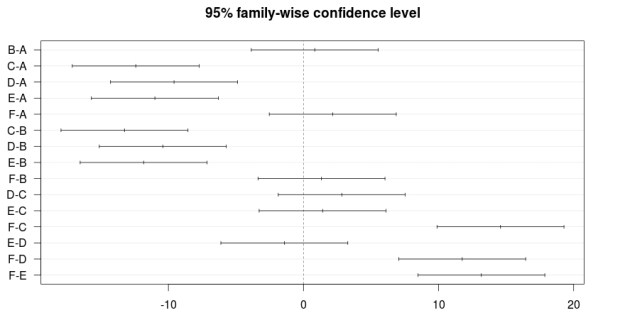
There is a lot of information here. To make things easy, wherever there is a p adj of less than 0.05 that means that there is a difference between those two means. For example, bug spray F and E have a difference of 13.16 that has a p adj of zero. So these two means are really different statistically.This chart also includes the lower and upper bounds of the confidence interval.

The results can also be plotted with the script below

> plot(BugSpraydiff, las=1)

Below is the plot

Conclusion

ANOVA is used to calculate if there is a difference of means among three or more groups. This analysis can be conducted in R using various scripts and codes.

Qualitative Research: Hermeneutics & Phenomenology

Advertisements

Key components of qualitative research include hermeneutics and phenomenology. This post will examine these two terms and their role in qualitative research.

Hermeneutics

Hermeneutics is essential a method of interpretation of a text. The word hermeneutics comes from Hermes, the Greek messenger God. As such, at least for the ancient Greeks, there was a connection with interpreting and serving as a messenger. Today, his term is most commonly associated with theology such as biblical hermeneutics.

In relation to biblical hermeneutics, Augustine (354-430) develop a process of hermeneutics that was iterative. Through studying the Bible and the meaning of one’s own interpretations of the Bible, a person can understand divine truth. There was no need to look at the context, history, or anything else. Simply the Word and your interpretation of it.

In the 17th century, the Dutch philosopher Spinoza expanded on Augustine’s view of hermeneutics by stating that the text, its historical context, and even the author of a text, should be studied to understand the text. In other words, text plus context leads to truth.

By combing Augustine’s view of the role of the individual in hermeneutics with Spinoza’s contribution to the context we arrive at how interpretation happens in qualitative research.

In qualitative research, data interpretation (aka hermeneutics) involves the individual’s interpretation combined with the context that the data comes from. Both the personal interpretation and the context of the data influence each other.

Phenomenology

The develops in hermeneutics led to the development of the philosophy called phenomenology. Phenomenology states that a phenomenon can only be understood subjectively (from a certain viewpoint) and intuitively (through thinking and finding hidden meaning).

In phenomenology, interpretation happens through describing events, analyzing an event, and by connecting a current experience to another one or by finding similarities among distinct experiences.

For a phenomenologist, there is a constant work of reducing several experiences into abstract constructs through an inductive approach. This is a form of theory building that is connected with several forms of qualitative research, such as grounded theory.

Conclusion

Hermeneutics has played an important role in qualitative research by influencing the development of phenomenology. The study of a phenomenon is for the purpose of seeing how context will influence interpretation.

Experimental Designs: Between Groups

Advertisements

In experimental research, there are two common designs. They are between and within group design. The difference between these two groups of designs is that between group involves two or more groups in an experiment while within group involves only one group.

This post will focus on between group designs. We will look at the following forms of between group design…

  • True/quasi-experiment
  • Factorial Design

True/quasi Experiment

A true experiment is one in which the participants are randomly assigned to different groups. In a quasi-experiment, the researcher is not able to randomly assigned participants to different groups.

Random assignment is important in reducing many threats to internal validity. However, there are times when a researcher does not have control over this, such as when they conduct an experiment at a school where classes have already been established. In general, a true experiment is always considered superior methodological to a quasi-experiment.

Whether the experiment is a true experiment or a quasi-experiment. There are always two groups that are compared in the study. One group is the controlled group, which does not receive the treatment. The other group is called the experimental group, which receives the treatment of the study. It is possible to have more than two groups and several treatments but the minimum for between group designs is two groups.

Another characteristic that true and quasi-experiments have in common is the type of formats that the experiment can take. There are two common formats

  • Pre- and post test
  • Post test only

A pre- and post test involves measuring the groups of the study before the treatment and after the treatment. The desire normally is for the groups to be the same before the treatment and for them to be different statistically after the treatment. The reason for them being different is because of the treatment, at least hopefully.

For example, let’s say you have some bushes and you want to see if the fertilizer you bought makes any difference in the growth of the bushes.  You divide the bushes into two groups, one that receives the fertilizer (experimental group), and one that does not (controlled group). You measure the height of the bushes before the experiment to be sure they are the same. Then, you apply the fertilizer to the experimental group and after a period of time, you measure the heights of both groups again. If the fertilized bushes grow taller than the control group you can infer that it is because of the fertilizer.

Post-test only design is when the groups are measured only after the treatment. For example, let’s say you have some corn plants and you want to see if the fertilizer you bought makes any difference.in the amount of corn produced.  You divide the corn plants into two groups, one that receives the fertilizer (experimental group), and one that does not (controlled group). You apply the fertilizer to the control group and after a period of time, you measure the amount of corn produced. If the fertilized corn produces more you can infer that it is because of the fertilizer. You never measure the corn beforehand because they had not produced any corn yet.

Factorial design involves the use of more than one treatment. Returning to the corn example, let’s say you want to see not only how fertilizer affects corn production but also how the amount of water the corn receives affects production as well.

In this example, you are trying to see if there is an interaction effect between fertilizer and water.  When water and fertilizer are increased does production increase, is there no increase, or if one goes up and the other goes down does that have an effect?

Conclusion

Between group designs such as true and quasi-experiments provide a way for researchers to establish cause and effect. Pre- post test is employed as well as factorial designs to establish relationships between variables

Calculating Chi-Square in R

Advertisements

There are times when conducting research that you want to know if there is a difference in categorical data. For example, is there a difference in the number of men who have blue eyes and who have brown eyes. Or is there a relationship between gender and hair color. In other words, is there a difference in the count of a particular characteristic or is there a relationship between two or more categorical variables.

In statistics, the chi-square test is used to compare categorical data. In this post, we will look at how you can use the chi-square test in R.

For our example, we are going to use data that is already available in R called “HairEyeColor”. Below is the data

> HairEyeColor
, , Sex = Male

       Eye
Hair    Brown Blue Hazel Green
  Black    32   11    10     3
  Brown    53   50    25    15
  Red      10   10     7     7
  Blond     3   30     5     8

, , Sex = Female

       Eye
Hair    Brown Blue Hazel Green
  Black    36    9     5     2
  Brown    66   34    29    14
  Red      16    7     7     7
  Blond     4   64     5     8

As you can see, the data comes in the form of a list and shows hair and eye color for men and women in separate tables. The current data is unusable for us in terms of calculating differences. However, by using the ‘marign.table’ function we can make the data useable as shown in the example below.

> HairEyeNew<- margin.table(HairEyeColor, margin = c(1,2))
> HairEyeNew
       Eye
Hair    Brown Blue Hazel Green
  Black    68   20    15     5
  Brown   119   84    54    29
  Red      26   17    14    14
  Blond     7   94    10    16

Here is what we did. We created the variable ‘HairEyeNew’ and we stored the information from ‘HairEyeColor’ into one table using the ‘margin.table’ function. The margin was set 1,2 for the table.

Now all are data from the list are combined into one table.

We now want to see if there is a particular relationship between hair and eye color that is more common. To do this, we calculate the chi-square statistic as in the example below.

> chisq.test(HairEyeNew)

	Pearson's Chi-squared test

data:  HairEyeNew
X-squared = 138.29, df = 9, p-value < 2.2e-16

The test tells us that one or more of the relationships are more common than others within the table. To determine which relationship between hair and eye color is more common than the rest we will calculate the proportions for the table as seen below.

> HairEyeNew/sum(HairEyeNew)
       Eye
Hair          Brown        Blue       Hazel       Green
  Black 0.114864865 0.033783784 0.025337838 0.008445946
  Brown 0.201013514 0.141891892 0.091216216 0.048986486
  Red   0.043918919 0.028716216 0.023648649 0.023648649
  Blond 0.011824324 0.158783784 0.016891892 0.027027027

As you can see from the table, brown hair and brown eyes are the most common (0.20 or 20%) flowed by blond hair and blue eyes (0.15 or 15%).

Conclusion

The chi-square serves to determine differences among categorical data. This tool is useful for calculating the potential relationships among non-continuous variables

Philosophical Foundations of Research: Epistemology

Advertisements

Epistemology is the study of the nature of knowledge. It deals with questions as is there truth and or absolute truth, is there one way or many ways to see something. In research, epistemology manifest itself in several views. The two extremes are positivism and interpretivism.

Positivism

Positivism asserts that all truth can be verified and proven scientifically and can be measured and or observed. This position discounts religious revelation as a source of knowledge as this cannot be verified scientifically. The position of positivist is also derived from realism in that there is an external world out there that needs to be studied.

For researchers, positivism is the foundation of quantitative research. Quantitative researchers try to be objective in their research, they try to avoid coming into contact with whatever they are studying as they do not want to disturb the environment. One of the primary goals is to make generalizations that are applicable in all instances.

For quantitative researchers, they normally have a desire to test a theory. In other words, the develop one example of what they believe is a truth about a phenomenon (a theory) and they test the accuracy of this theory with statistical data. The data determines the accuracy of the theory and the changes that need to be made.

By the late 19th and early 20th centuries, people were looking for alternative ways to approach research. One new approach was interpretivism.

Interpretivism

Interpretivism is the complete opposite of positivism in many ways. Interpretivism asserts that there is no absolute truth but relative truth based on context. There is no single reality but multiple realities that need to be explored and understood.

For interpretist, There is a fluidity in their methods of data collection and analysis. These two steps are often iterative in the same design. Furthermore, intrepretist see themselves not as outside the reality but a player within it. Thus, they often will share not only what the data says but their own view and stance about it.

Qualitative researchers are interpretists. They spend time in the field getting close to their participants through interviews and observations. They then interpret the meaning of these communications to explain a local context specific reality.

While quantitative researchers test theories, qualitative researchers build theories. For qualitative researchers, they gather data and interpret the data by developing a theory that explains the local reality of the context. Since the sampling is normally small in qualitative studies, the theories do not often apply to many.

Conclusion

There is little purpose in debating which view is superior. Both positivism and interpretivism have their place in research. What matters more is to understand your position and preference and to be able to articulate in a reasonable manner. It is often not what a person does and believes that is important as why they believe or do what they do.

Internal Validity

Advertisements

In experimental research design, internal validity is the appropriateness of the inferences made about cause and effects relationships between the independent and dependent variables. If there are threats to internal validity it may mean that the cause and effect relationship you are trying to establish is not real. In general, there are three categories of external validity, which are..,

  • Participant threats
  • Treatment threats
  • Procedural threats

We will not discuss all three categories but will focus on participant threats

Participant Threats

There are several forms of threats to internal validity that relate to participants. Below is a list

  • History
  • Maturation
  • Regression
  • Selection
  • Mortality

History

A historical threat to internal validity is the problem of the passages of time from  the beginning to the end of the experiment. During this elapse of time, the groups involved in the study may have different experiences. These different experiences are history threats. One way to deal with this threat is to be sure that the conditions of the experiment are the same.

Maturation

Maturation threat is the problem of how people change over time during an experiment. These changes make it hard to infer if the results of a study are because of the treatment or because of maturation. One way to deal with this threat is to select participants who develop in similar ways and speed.

Regression

Regression threat is the action of the researcher selecting extreme cases to include in their sample. Eventually, these cases regress to the mean, which impacts the results of the pretest or posttest. One option for overcoming this problem is to avoid outliers when selecting the sample.

Selection

Selection bias is the poor habit of picking people in a non-random why for an experiment Examples of this include choosing mostly ‘smart people for an experiment. Or working with petite women for a study on diet and exercise. Random selection is the strongest way to deal with this threat.

Mortality

Mortality is the lost of participants in a study. It is common for participants in a study to dropout and quit for many reasons. This leads to a decrease in the sample size, which weakens the statistical interpretation. Dealing with this requires using larger sample sizes as well as comparing data of dropouts with those who completed the study.

Conclusion

Internal validity can ruin a paper that has not careful planned out how these threats work together to skew results. Researchers need to have an idea of what threats are out there as well as strategies that can alleviate them.

Comparing Samples in R

Advertisements

Comparing groups is a common goal in statistics. This is done to see if there is a difference between two groups. Understanding the difference can lead to insights based on statistical results. In this post, we will examine the following statistical test for comparing samples.

  • t-test/Wilcoxon test
  • Paired t-test

T-test & Wilcoxon Test

The T-test indicates if there is a significant statistical difference between two groups. This is useful if you know what the difference between the two groups are. For example, if you are measuring height of men and women, if you find that men are taller through a t-test, you can state that gender influences height because the only difference between men and women in this example is their gender.

Below is an example of conducting a t-test in R. In the example, we are looking at if there is a difference in body temperature between beavers who are active versus beavers who are not.

> t.test(temp ~ activ, data = beaver2)

	Welch Two Sample t-test

data:  temp by activ
t = -18.548, df = 80.852, p-value < 2.2e-16
alternative hypothesis: true difference in means is not equal to 0
95 percent confidence interval:
 -0.8927106 -0.7197342
sample estimates:
mean in group 0 mean in group 1 
       37.09684        37.90306

Here is what happened

  1. We use the ‘t.test’ function
  2. Within the ‘t.test’ function we indicate that we want to if there is a difference in ‘temp’ when compared on the factor variable ‘activ’ in the data ‘beaver2’
  3. The output provides a lot of information. The t-stat is -18.58 any number at + 1.96 indicates statistical difference.
  4. Df stands for degrees of freeedom and is used to determine the t-stat and p-value.
  5. The p-value is basically zero. Anything less than 0.05 is considered statistically significant.
  6. Next, we have the 95% confidence interval, which is the range of the difference of the means of the two groups in the population.
  7. Lastly, we have the means of each group. Group 0, the inactive group. had a mean of 37.09684. Group 1. the active group, has a mean of  37.90306.

T-test assumes that the data is normally distributed. When normality is a problem, it is possible to use the Wilcoxon test instead. Below is the script for the Wilcoxon Test using the same example.

> wilcox.test(temp ~ activ, data = beaver2)

	Wilcoxon rank sum test with continuity correction

data:  temp by activ
W = 15, p-value < 2.2e-16
alternative hypothesis: true location shift is not equal to 0

A closer look at the output indicates the same results for the most part. Instead of the t-stat the W-stat is used but the p value is the same for both test.

Paired T-Test

A paired t-test is used when you want to compare how the same group of people respond to different interventions. For example, you might use this for a before and after experiment. We will use the ‘sleep’ data in R  to compare a group of people when they receive different types of sleep medication. The script is below

> t.test(extra ~ group, data = sleep, paired = TRUE)

	Paired t-test

data:  extra by group
t = -4.0621, df = 9, p-value = 0.002833
alternative hypothesis: true difference in means is not equal to 0
95 percent confidence interval:
 -2.4598858 -0.7001142
sample estimates:
mean of the differences 
                  -1.58

Here is what happened

  1. We used the ‘t.test’ function and indicate we want to see if ‘extra’ (amount of sleep) is influenced by ‘group’ (two types of sleep medication.
  2. We add the new argument of ‘paired = TRUE’ this tells R that this is a paired test.
  3. The output is the same information as in the regular t.test. The only differences is at the bottom where R only tells you the difference between the two groups and not the means of each. For this example, the people slept about 1 hour and 30 minutes longer on the second sleep medication when compared to the first.

Conclusion

Comparing samples in R is a simple process of understanding what you want to do. With this knowledge, the script and output are not too challenge even for many beginners

Philosophical Foundations of Research: Ontology

Advertisements

Philosophy is a term that is commonly used but hard to define. To put it simply, philosophy explains an individuals or a groups worldview in general or in a specific context. Such questions as the nature of knowledge, reality, and existence are questions that philosophy tries to answer. There are different schools of thought on these questions and these are what we commonly call philosophies

In this post, we will try to look at ontology, which is the study of the nature of reality. In particular, we will define it as well as explain its influence on research.

Ontology

Ontology is the study of the nature of being. It tries to understand the reality of existence. In this body of philosophy, there are two major camps, ontological realism, and ontological idealism.

Ontological realism believes that reality is objective. In other words, there is one objective reality that is external to each individual person. We are in a reality and we do not create it.

Ontological idealism is the opposite extreme. This philosophy states that there are multiple realities an each depends on the person. My reality is different from your reality and each of us builds our own reality.

Ontological realism is one of the philosophical foundations for quantitative research. Quantitative research is a search for an objective reality that accurately explains whatever is being studied.

For qualitative researchers, ontological idealism is one of their philosophical foundations. Qualitative researchers often support the idea of multiple realities. For them, since there is no objective reality it is necessary to come contact with people to explain their reality.

Something that has been alluded to but not stated specifically is the role of independence and dependence of individuals. Regardless of whether someone ascribes to ontological realism or idealis, there is the factor of whether people or independent of reality or dependent to reality. The level of independence and dependence contributes to other philosophies such as objectivism constructivism and pragmatism.

Objectivism, Constructivism and Pragmatism

Objectivism is the belief that there is a single reality that is independent of the individuals within it. Again this is the common assumption of quantitative research. At the opposite end we have constructivism which states that there are multiple realities and the are dependent on the individuals who make each respective reality.

Pragmatism supports the idea of a single reality with the caveat that it is true if it is useful and works. The application of the idea depends upon the individuals, which pushes pragmatism into the realm of dependence.

Conclusion

From this complex explanation of ontology and research comes the following implications

  • Quantitative and qualitative researchers differ in how they see reality. Quantitative researchers are searching for and attempting to explain a single reality while qualitative researchers are searching for and trying to explain multiple realities.
  • Quantitative and qualitative researchers also differ on the independence of reality. Quantitative researchers see reality as independent of people while qualitative researchers see reality as dependent on people
  • These factors of reality and its dependence shape the methodologies employed by quantitative and qualitative researchers.

Experimental Design: Treatment Conditions and Group Comparision

Advertisements

A key component of experimental design involves making decisions about the manipulation of the treatment conditions. In this post, we will look at the following traits of treatment conditions

  • Treatment Variables
  • Experimental treatment
  • Conditions
  • Interventions
  • Outcomes

Lastly, we will examine group comparison.

One of the most common independent variables in experimental design are treatment and measured variables. Treatment variables are manipulated by the researcher. For example, if you are looking at how sleep affects academic performance, you may manipulate the amount of sleep participants receive in order to determine the relationship between academic performance and sleep.

Measured variables are variables that are measured by are not manipulated by the researcher. Examples include age, gender, height, weight, etc.

An experimental treatment is the intervention of the researcher to alter the conditions of an experiment. This is done by keeping all other factors constant and only manipulating the experimental treatment, it allows for the potential establishment of a cause-effect relationship. In other words, the experimental treatment is a term for the use of a treatment variable.

Treatment variables usually have different conditions or levels in them. For example, if I am looking at sleep’s affect on academic performance. I may manipulate the treatment variable by creating several categories of the amount of sleep. Such as high, medium, and low amounts of sleep.

Intervention is a term that means the actual application of the treatment variables. In other words, I broke my sample into several groups and caused one group to get plenty of sleep the second group to lack a little bit of sleep and the last group got nothing. Experimental treatment and intervention mean the same thing.

The outcome measure is the experience of measuring the outcome variable. In our example, the outcome variable is academic performance.

Group Comparison

Experimental design often focuses on comparing groups. Groups can be compared between groups and within groups. Returning to the example of sleep and academic performance, a between group comparison would be to compare the different groups based on the amount of sleep they received. A within group comparison would be to compare the participants who received the same amount of sleep.

Often there are at least three groups in an experimental study, which are the controlled, comparison, and experimental group. The controlled group receives no intervention or treatment variable. This group often serves as a baseline for comparing the other groups.

The comparison group is exposed to everything but the actual treatment of the study. They are highly similar to the experimental group with the experience of the treatment. Lastly, the experimental group experiences the treatment of the study.

Conclusion

Experiments involve treatment conditions and groups. As such, researchers need to understand their options for treatment conditions as well as what types of groups they should include in a study.

Examining Distributions In R

Advertisements

Normal distribution is an important term in statistics. When we say normal distribution, we are speaking of the traditional bell curve concept. Normal distribution is important because it is often an assumption of inferential statistics that the distribution of data points is normal. Therefore, one of the first things you do when analyzing data is to check for normality.

In this post, we will look at the following ways to assess normality.

  • By graph
  • By plots
  • By test

Checking Normality by Graph

The easiest and crudest way to check for normality is visually through the use of histograms. You simply look at the histogram and determine how closely it resembles a bell.

To illustrate this we will use the ‘beaver2’ data that is already loaded into R. This dataset contains five variables “day”, “time”, “temp”, and “activ” for data about beavers. Day indicates what day it was, time indicates what time it was, temp is the temperature of the beavers, and activ is whether the beavers were active when their temperature was taking. We are going to examine the normality of the temperature of active and inactive. Below is the code

> library(lattice)
> histogram(~temp | factor(activ), data = beaver2)
  1. We loaded the ‘lattice’ package. (If you don’t have this package please download)>
  2. We used the histogram function and indicate the variable ‘temp’ then the union ( | ) followed by the factor variable ‘activ’ (0 = inactive, 1 = active)
  3. Next, we indicate the dataset we are using ‘beaver2’
  4. After pressing ‘enter’ you should see the following

As you look at the histograms, you can say that they are somewhat normal. The peaks of the data are a little high in both. Group 1 is more normal than Group 0. The problem with visual inspection is lack of accuracy in interpretation. This is partially solved by using QQ plots.

Checking Normality by Plots

QQplots are useful for comparing your data with a normally distributed theoretical dataset. The QQplot includes a line of a normal distribution and the data points for your data for comparison. The more closely your data follows the line the more normal it is. Below is the code for doing this with our beaver information.

> qqnorm(beaver2$temp[beaver2$activ==1], main = 'Active')
> qqline(beaver2$temp[beaver2$activ==1])

Here is what we did

  1. We used the ‘qqnorm’ function to make the plot
  2. Within the ‘qqnorm’ function we tell are to use ‘temp’ from the ‘beaver2’ dataset.
  3. From the ‘temp’ variable we subset the values that have a 1 in the ‘activ’ variable.
  4. We give the plot a title by adding ‘main = Active’
  5. Finally, we add the ‘qqline’ using most of the previous information.
  6. Below is how the plot should look

Going by sight again. The data still looks pretty good. However, one last test will determine conclusively if the dataset is normal or not.

Checking Normality by Test

The Shapiro-Wilks normality test determines the probability that the data is normally distributed. The lower the probability the less likely that the data is normally distributed. Below is the code and results for the Shapiro test.

> shapiro.test(beaver2$temp[beaver2$activ==1])

	Shapiro-Wilk normality test

data:  beaver2$temp[beaver2$activ == 1]
W = 0.98326, p-value = 0.5583

Here is what happened

  1. We use the ‘shapiro.test’ function for ‘temp’ of only the beavers who are active (activ = 1)
  2. R tells us the p-value is 0.55 or 55%
  3. This means that the probability of our data being normally distributed is 55% which means it is highly likely to be normal.

Conclusion

It is necessary to always test the normality of data before data analysis. The tips presented here provide some framework for accomplishing this.

Characteristics of Experimental Design

Advertisements

In a previous post, we began a discussion on experimental design. In this post, we will begin a discussion on the characteristics of experimental design. In particular, we will look at the following

  • Random assignment
  • Control over extraneous variables

Random Assignment

After developing an appropriate sampling method, a researcher needs to randomly assign individuals to the different groups of the study. One of the main reasons for doing this is to remove the bias of individual differences in all groups of the study.

For example, if you are doing a study on intelligence. You want to make sure that all groups have the same characteristics of intelligence. This helps for the groups to equate or to be the same. This prevents people from saying the reason there are differences between groups is because the groups are different and not because of the treatment.

Control Over Extraneous Variables

Random assignment directly leads to the concern of controlling extraneous variables. Extraneous variables are any factors that might influence the cause and effect relationship that you are trying to establish. These other factors confound or confuse the results of a study. There are several methods for dealing with this as shown below

  • Pretest-posttest
  • Homogeneous sampling
  • Covriate
  • Matching

Pretest-Posttest

A pre-test post-test allows a researcher to compare the measurement of something before the treatment and after the treatment. The assumption is that any difference in the scores of before and after is due to the treatment.Doing the tests takes into account the confounding of the different contexts of the setting and individual characteristics.

Homogeneous Sampling

This approach involves selecting people who are highly similar on the particular trait that is being measured. This removes the problem of individual differences when attempting to interpret the results. The more similar the subjects in the sample are the more controlled the traits of the people are controlled for.

Covariate

Covariates is a statistical approach in which controls are placed on the dependent variable through statistical analysis. The influence of other variables are removed from the explained variance of the dependent variable. Covariates help to explain more about the relationship between the independent and dependent variables.

This is a difficult concept to understand. However, the point is that you use covariates to explain in greater detail the relationship between the independent and dependent variable by removing other variables that might explain the relationship.

Matching

Matching is deliberate, rather than randomly, assigning subject to various groups. For example, if you are looking at intelligence. You might match high achievers in both groups of the study. By placing he achievers in both groups you cancel out there difference.

Conclusion

Experimental design involves the cooperation in random assignment of inclusive differences in a sample. The goal of experimental design is to be sure that the sample groups are mostly the same in a study. This allows for concluding that what happened was due to the treatment.

Two-Way Tables in R

Advertisements

A two-way table is used to explain two or more categorical variables at the same time. The difference between a two-way table and a frequency table is that a two-table tells you the number of subjects that share two or more variables in common while a frequency table tells you the number of subjects that share one variable.

For example, a frequency table would be gender. In such a table, you only know how many subjects are male or female. The only variable involved is gender. In a frequency table, you would learn some of the following

  • Total number of men
  • Total number of women
  • Total number of subjects in the study

In a two-way table, you might look at gender and marital status. In such a table you would be able to learn several things

  • Total number of men are married
  • Total number of men are single
  • Total number of women are married
  • Total number of women are single
  • Total number of men
  • Total number of women
  • Total number of married subjects
  • Total number of single subjects
  • Total number of subjects in the study

As such, there is a lot of information in a two-way table. In this post, we will look at the following

  • How to create a table
  • How to add margins to a table
  • How to calculate proportions in a table

Creating a Table

In the example, we are going to look at two categorical variables. One variable is gender and the other is marital status. For gender, the choices are “Male” and Female”. For marital status, the choicest are ‘Married” and “Single”. Below is the code for developing the table.

Marriage_Study<-matrix(c(34,20,19,42), ncol = 2)
colnames(Marriage_Study) <- c('Male', 'Female')
rownames(Marriage_Study) <- c('Married', 'Single')
Marriage_table <- as.table(Marriage_Study)
print(Marriage_table)

There has already been a discussion on creating matrices in R. Therefore, the details of this script will not be explained here.

If you type this correctly and run the script you should see the following

        Male Female
Married   34     19
Single    20     42

This table tells you about married and single people broken down by their gender. For example, 34 males are married.

Adding Margins and Calculating Proportions

A useful addition to a table is to add the margins. The margins tell you the total number of subjects in each row and column of a table. To do this in R use the ‘addmargins’ function as indicated below.

> addmargins(Marriage_table)
        Male Female Sum
Married   34     19  53
Single    20     42  62
Sum       54     61 115

We now know the total number of Married people, Singles, Males, and Females. In addition to the information we already knew.

One more useful piece of information is to calculate the proportions. This will allow us to know what percentage of each two-way possibility makes up the table. To do this we will use the “prop.table” function. Below is the script

> prop.table(Marriage_table)
             Male    Female
Married 0.2956522 0.1652174
Single  0.1739130 0.3652174

As you can see, we now know the proportions of each category in the table.

Conclusions

This post provided information on how to construct and manipulate data that is in a two-way table. Two-way tables are a useful way of describing categorical variables.

Experimental Design: A Background

Advertisements

Experimental design is now considered a standard methodology in research. However, this now classic design has not always been a standard approach. In this post, we will the following

  • The definition of experiment
  • The history of experiments
  • When to conduct experiments

Definition

The word experiment is derived from the word experience. When conducting an experiment, the researcher assigns people to have different experiences. He then determines if the experience he assigned people to had some effect on some sort of outcome. For example, if I want to know if the experience of sunlight affects the growth of plants I may develop two different experiences

  • Experience 1: Some plants receive sunlight
  • Experience 2: Some plants receive no sunlight

The outcome is the growth of the plants.By giving the plants different experiences of sunlight I can determine if sunlight influences the growth of plants.

History of Experiments

Experiments have been around informally since the 10th century with work done in the field of medicine. The use of experiments as known today began in the early 20th century in the field of psychology. By the 1920’s group comparison became an establish characteristics of experiments. By the 1930’s, random assignment was introduced. By the 1960’s various experimental designs were codified and documented. By the 1980’s there was literature coming out that addressed threats to validity.

Since the 1980’s experiments have become much more complicated with the development of more advanced statistical software problems. Despite all of the new complexity, normally simple experimental designs are easier to understand

When to Conduct Experiments

Experiments are conducted to attempt to establish a cause and effect relationship between independent and dependent variables. You try to create a controlled environment in which you provide the experience or independent variable(s) and then measure how they affect the outcome or dependent variable.

Since the setting of the experiment is controlled. You can say withou a doubt that only the experience influence the outcome. Off course, in reality, it is difficult to control all the factors in a study. The real goal is to try and limit the effect that these other factors have on the outcomes of a study.

Conclusion

Despite their long history, experiments are relatively new in research. This design has grown and matured over the years to become a powerful method for determining cause and effect. Therefore, researchers should e aware of this approach for use in their studies.

Plotting Correlations in R

Advertisements

A correlation indicates the strength of the relationship between two or more variables.  Plotting correlations allows you to see if there is a potential relationship between two variables. In this post, we will look at how to plot correlations with multiple variables.

In R, there is a built-in dataset called ‘iris’. This dataset includes information about different types of flowers. Specifically, the ‘iris’ dataset contains the following variables

  • Sepal.Length
  • Sepal.Width
  • Petal.Length
  • Petal.Width
  • Species

You can confirm this by inputting the following script

> names(iris)
[1] "Sepal.Length" "Sepal.Width"  "Petal.Length" "Petal.Width"  "Species"

We now want to examine the relationship that each of these variables has with each other. In other words, we want to see the relationship of

  • Sepal.Length and Sepal.Width
  • Sepal.Length and Petal.Length
  • Sepal.Length and Petal.Width
  • Sepal.Width and Petal.Length
  • Sepal.Width and Petal.Width
  • Petal.Length and Petal.Width

The ‘Species’ variable will not be a part of our analysis since it is a categorical variable and not a continuous one. The type of correlation we are analyzing is for continuous variables.

We are now going to plot all of these variables above at the same time by using the ‘plot’ function. We also need to tell R not to include the “Species” variable. This is done by adding a subset code to the script. Below is the code to complete this task.

> plot(iris[-5])

Here is what we did

  1. We use the ‘plot’ function and told R to use the “iris” dataset
  2. In brackets, we told R to remove ( – ) the 5th variable, which was species
  3. After pressing enter you should have seen the following

The variable names are placed diagonally from left to right. The x-axis of a plot is determined by variable name in that column. For example,

  • The variable of the x-axis of the first column is ‘Sepal.Length”
  • The variable of the x-axis of the second column is ‘Sepal.Width”
  • The variable of the x-axis of the third column is ‘Petal.Length”
  • The variable of the x-axis of the fourth column is ‘Petal.Width”

The y-axis is determined by the variable that is in the same row as the plot. For example,

  • The variable of the y-axis of the first column is ‘Sepal.Length”
  • The variable of the y-axis of the second column is ‘Sepal.Width”
  • The variable of the y-axis of the third column is ‘Petal.Length”
  • The variable of the y-axis of the fourth column is ‘Petal.Width”

AS you can see, this is the same information. We will now look at a few examples of plots

  • The plot in the first column second row plots “Sepal.Length” as the x-axis and “Sepal.Width” as the y-axis
  • The plot in the first column third row plots “Sepal.Length” as the x-axis and “Petal.Length” as the y-axis
  • The plot in the first column fourth row plots “Sepal.Length” as the x-axis and “Petal.Width” as the y-axis

Hopefully, you can see the pattern. The plots above the diagonal are mirrors of the ones below. If you are familiar with correlational matrices this should not be surprising.

After a visual inspection, you can calculate the actual statistical value of the correlations. To do so use the script below and you will see the table below after it.

> cor(iris[-5])
             Sepal.Length Sepal.Width Petal.Length Petal.Width
Sepal.Length    1.0000000  -0.1175698    0.8717538   0.8179411
Sepal.Width    -0.1175698   1.0000000   -0.4284401  -0.3661259
Petal.Length    0.8717538  -0.4284401    1.0000000   0.9628654
Petal.Width     0.8179411  -0.3661259    0.9628654   1.0000000

As you can see, there are many strong relationships between the variables. For example “Petal.Width” and “Petal.Length” has a correlation of .96, which is almost perfect. This means that when “Petal.Width” grows by one unit “Petal.Length” grows by .96 units.

Conclusion

Plots help you to see the relationship between two variables. After visual inspection, it is beneficial to calculate the actual correlation.

Analyzing Qualitative Data

Advertisements

Analyzing qualitative data is not an easy task. Instead of punching script into a statistical programming and receiving results, you become the computer who needs to analyze the data. For this reason alone, the analysis of qualitative data is difficult as different people will have vastly different interpretations of data.

This post will look at the following

  • The basic characteristics of qualitative data analysis
  • Exploring and coding data

Basic Characteristics

Qualitative data analysis has the following traits

  • Inductive form
  • Analyzing data while still collecting data
  • Interpretative

Qualitative analysis is inductive by nature. This indicates that a researcher goes from specific examples to the generation of broad concepts or themes. In many ways, the researcher is trying to organize and summarize what they found in their research coherently in nice neat categories and themes.

Qualitative analysis also involves analyzing while still collecting data.You begin to process the data while still accumulating data. This is an iterative process that involves moving back and forth between analysis and collection of data. This is a strong contrast to quantitative research which is usually linear in nature.

Lastly, qualitative analysis is highly subjective. Everyone who views the data will have a different perspective on the results of a study. This means that people will all see different ideas and concepts that are important in qualitative research.

Exploring and Coding

Coding data in qualitative research can be done with text, images, and or observations. In coding, a researcher determines which information to share through the development of segments, codes, categories, themes. Below is the process for developing codes and categories

1. Read the text

Reading the text means to get familiar with it and now what is discussed.

2. Pick segments of quotes to include in the article

After reading the text, you begin to pick quotes from the interview that will be used for further inductive processing

3, Develop codes from segments

After picking many different segments, you need to organize them into codes. All segments in one code have something in common that unites them as a code.

4. Develop categories from codes

The next level of abstract is developing categories from codes. The same process in step 3 is performed here.

5. Develop themes from categories

This final step involves further summarizing the results of the categories development into themes. The process is the same as steps 3 and 4.

Please keep in mind that as you move from step 1 to 5 the number of concepts decreases. For example, you may start with 50 segments that are reduced to 10 codes then reduce to 5 categories and finally 3 themes.

Conclusion

Qualitative data analysis is not agreed upon. There are many different ways to approach this. In general, the best approach possible is one that is consistent in terms of its treatment of the data. The example provided here is just one approach to organizing data in qualitative research.

Basics of Histograms and Plots in R

Advertisements

R has many fascinating features for creating histograms and plots. In this post, we will only cover some of the most basic concepts of make histograms and plots in R. The code for the data we are using is available in a previous post.

Making a Histogram

We are going to make a histogram of the ‘mpg’ variable in our ‘cars’ dataset. Below is the code for doing this followed by the actual histogram.

Histogram of mpg variable

Here is what we did

  1. We used the ‘hist’ function to create the histogram
  2. Within the hist function we told r to make a histogram of ‘mpg’ variable found in the ‘cars’ dataset.
  3. An additional argument that we added was ‘col’. This argument is used to determine the color of the bars in the histogram. For our example, the color was set to gray.

Plotting Multiple Variables

Before we look at plotting multiple variables you need to make an adjustment to the ‘cyl’ variable in our cars variable. THis variable needs t be changed from a numeric to a factor variable as shown below

cars$cyl<- as.factor(cars$cyl)

Boxplots are an excellent way of comparing groups visually. In this example, we will compare the ‘mpg’ or miles per gallon variable by the ‘cyl’ or number of cylinders in the engine variable in the ‘cars’ dataset. Below is the code and diagram followed by an explanation.

boxplot(mpg ~ cyl, data = cars)

Here is what happened.

  1. We use the ‘boxplot’ function
  2. Within this function we tell are to plot mpg and cyl using the tilda  ” ~ ” to tell R to compare ‘mpg’ by the number of cylinders

The box of the boxplot tells you several things

  1. The bottom of the box tells you the 25th percentile
  2. The line in the middle of the box tells you the median
  3. The top of the box tells you the 75th percentile
  4. The bottom line tells you the minimum or lowest value excluding outliers
  5. The top line tells you the maximum or highest value excluding outliers

In order boxplot above, there are three types of cylinders 4, 6, and 8. For 4 cylinders the 25th percentile is about 23 mpg, the 50th percentile is about 26 mpg, while the 75th percentile is about 31 mpg. The minimum value was about 22 and the maximum value was about 35 mpg. A close look at the different blots indicates that four cylinder cars have the best mpg followed by six and finally eight cylinders.

Conclusions

Histograms and boxplots serve the purpose of describing numerical data in a visual manner. Nothing like a picture helps to explain abstract concepts such mean and median.

Content Analysis In Qualitative Research

Advertisements

Content analysis serves the purpose in qualitative research to enable you to study human behavior indirectly through how people choose to communicate. The type of data collected can vary tremendously in this form of research. However, common examples of data include images, documents, and media.

In this post, we will look at the following in relation to content analysis

  • The purpose of content analysis
  • Coding in content analysis
  • Analysis in content analysis
  • Pros and cons in content analysis

Purpose

The purpose of content analysis is to study the central phenomenon through the analysis of examples of the communication of people connected with the central phenomenon. This information is coded into categories and themes. Categories and themes are just different levels of summarizing the results of the analysis. Themes are a summary of categories and categories are a direct summary of the data that was analyzed.

Coding

Coding the data is the process of organizing the results in a comprehensible way. In terms of coding, there are two choices.

  • Establish categories before beginning the analysis
  • Allow the categories to emerge during analysis

Which is best depends on the research questions and context of the study.

There are two forms of content manifest content and latent content. Manifest content is evidence that is directly seen such as the words in an interview. Latent content refers to the underlying meaning of content such as the interpretation of an interview.

The difference between these two forms of content is the objective or subjective nature of them. Many studies include both forms as this provides a fuller picture of the central phenomenon.

Analysis

There are several steps to consider when conducting a content analysis such as…

  • Define your terms-This helps readers to know what you are talking about
  • Explain what you are analyzing-This can be words, phrases, interviews, pictures, etc.
  • Explain your coding approach-Explained above
  • Present results

This list is far from complete but provides some basis for content analysis

Pros and Cons

Pros of content analysis include

  • Unobtrusive-Content analysis does not disturb the field or a people group normally
  • Replication-Since the documents are permanent, it is possible to replicate a study
  • Simplicity-Compared to other forms of research, content analysis is highly practical to complete

Cons include

  • Validity-It is hard to assess the validity of the analysis. The results of an analysis is the subjective opinion of an individual(s)
  • Limited data-Content analysis is limited to recorded content. This leaves out other forms of information

Conclusion

Content analysis provides another way for the qualitative research to analyze the world. There are strengths and weaknesses to this approach as there are such for forms of analysis. The point is to understand that there are times when the content analysis is appropriate

Describing Categorical Data in R

Advertisements

This post will explain how to create tables, calculate proportions, find the mode, and make plots for categorical variables in R. Before providing examples below is the script needed to setup the data that we are using

cars <- mtcars[c(1,2,9,10)]
cars$am <- factor(cars$am, labels=c('auto', 'manual'))
cars$gear <- ordered(cars$gear)

Tables

Frequency tables are useful for summarizing data that has a limited number of values. It represents how often a particular value appears in a dataset. For example, in our cars dataset, we may want to know how many different kinds of transmission we have. To determine this, use the code below.

> transmission_table <- table(cars$am)
> transmission_table

  auto manual 
    19     13

Here is what we did.

  1. We created the variable ‘transmission_table’
  2. In this variable, we used the ‘table’ function which took information from the ‘am’ variable from the ‘cars’ dataset.
  3. Final we displayed the information by typing ‘transmission_table’ and pressing enter

Proportion

Proportions can also be calculated. A proportion will tell you what percentage of the data belongs to a particular category. Below are the proportions of automatic and manual transmissions in the ‘cats’ dataset.

> transmission_table/sum(transmission_table)

   auto  manual 
0.59375 0.40625

The table above indicates that about 59% of the sample consists of automatic transmissions while about 40% are manual transmissions

Mode

When dealing with categorical variables there is not mean or median. However, it is still possible to calculate the mode, which is the most common value found. Below is the code.

> mode_transmission <-transmission_table ==max(transmission_table)
> names(transmission_table) [mode_transmission]
[1] "auto"

Here is what we did.

  1. We created the variable ‘mode_transmission’ and use the ‘max’ function to calculate the max number of counts in the transmission_table.
  2. Next we calculated the names found in the ‘transmission_table’ but we subsetted the ‘modes_transmission variable
  3. The most common value was ‘auto’ or automatic tradition,

Plots

Plots are one of the funniest capabilities in R. For now, we will only show you how to plot the data that we have been using. What is seen here is only the simplest and basic use of plots in R and there is a much more to it than this. Below is the code for plotting the number of transmission by type in R.

> plot(cars$am)

If you did this correctly you should see the following.

All we did was have R create a visual of the number of auto and manual transmissions.Naturally, you can make plots with continuous variables as well.

Conclusion

This post provided some basic information on various task can be accomplished in R for assessing categorical data. These skills will help researchers to take a sea of data and find simple ways to summarize all of the information.

Interviews in Qualitative Research

Advertisements

Interviews provide another way to collect data when conducting qualitative research. In this post, we will look at the following,

  • Characteristics of the interviewees
  • Types of interviews
  • Types of questions
  • Tips for conducting interviews

Characteristics of the Interviewees

Qualitative research involves two types of interviewees. If you are interviewing only one person this is a one-on-one interview. If you are interviewing a group this is often called a focus group.

One-on-One interviewing allows for in-depth data collection but takes a great deal of time. Focus groups, on the other hand, allows a researcher to gather a more varied opinion while saving time. Care also must be taken to make sure everyone participates in a focus group.

Types of Interviews

There are three common types of interview structured, semi-structured and informal. Structured interviews consist of a strict set of questions that are read in order word for word to interviewees. The goal is for the interviewee to answer all questions.

At the opposite extreme are informal interviews which are conversations that can flow in any direction. There is no set script of questions and the interviewee can go anywhere they want in the conversation

The middle ground between formal and informal interviewing is semi-structured interviews. In this approach, the researcher has questions they want to ask but they can vary the order, reword, ask follow-up questions, and or omit questions As such, there is a negotiable format in semi-structured interviews.

Types of Questions

There are several types of questions that are used in qualitative research. The types are self-explanatory and are listed below with an example

  • Knowledge question-“How does email work?”
  • Experience question-“What was it like growing up in the 1990’s?”
  • Opinion question-“What is your view of the tax cuts?”
  • Feeling question-“How do the change in curfew make you feel?”
  • Sensory question-“What does the kitchen smell like?”

Keep in mind that open ended questions are more common the closed-ended questions in qualitative research. This allows the interviewee to share their perspective rather than reply yes and no.

Tips for Conducting Interviews

Below are some tips for conducting interviews

  • Establish rapport-Establishing some form of relationship helps the interviewee to feel comfortable.
  • Location matters-Pick a quiet place to conduct the interview(s) if possible.
  • Record the interview-This is standard practice and is necessary in order to develop a transcript.
  • Take notes-Even with a recording, taking notes helps you to recall what happened during the interview.
  • Use wisdom with questions-Avoid leading questions which are unfair and make sure to ask one question at a time.
  • Show respect and courtesy during the interview-Be polite and considerate of the interviewee who has given you some of their time.

This not meant to be an exhaustive list but rather to provide some basic guidelines.

Conclusion

Along with observations, interviews is one of the most common forms of data collection in qualitative research. When you are in the field doing interviews it is important to consider what kind of interview you are doing, what questions you are going to ask, as well as the guidelines for conducting interviews presented in this post.

Observation in Qualitative Research

Advertisements

Observation is one of several forms of data collection in qualitative research. It involves watching and recording, through the use of notes, the behavior of people at the research site. In this post, we will cover the following

  • Different observational roles
  • The guidelines for observation
  • Problems with observation

Observational Roles

The role you play as an observer can vary between two extremes which are

nonparticipant to participant observer. A nonparticipant observer does not participate in any of the activities of the people being studied. For example, you are doing teaching observations, as you sit in the classroom you only watch what happens and never participate.

The other extreme is a participant observer. In this role, a researcher takes part in the activities of the group. For example, if you are serving as a teacher in a lower income community and are observing the students while you teach and interact with them this is participant observer.

Between these two extremes of non-participation and participation are several other forms of observation.  For example, a a non-participant observer can be an observer-as-participant or a complete observer. Furthermore, a participant observer can be a participant-as-observer or complete participant. The difference between these is whether or not the the group being studied knows the identity of the researcher.

Guidelines for Observation

  • Decide your role-What type of observer are you
  • Determine what you are observing-The observation must support what you are trying to learn about the central phenomenon 
  • Observe the subject multiple times-This provides a deeper understanding of the subjects
  • Take notes-An observer should of some way of taking notes. These notes are called fieldnotes and provide a summary of what was seen during the observation.

Problems with Observation

Common problems that are somewhat related when doing observations are observer effect, observer bias, observer expectations. The observer effect is how the people being observed change their behavior because of the presence of an outsider. For example, it is common for students to behave differently when the principal comes to observe the teacher. They modify their behavior because of the presence of the principal. In addition, if the students are aware of the principal’s purpose, they may act extra obedient for the sake of their teacher.

Observer bias is the potential that a researchers viewpoint may influence what they see. For example, if a principal is authoritarian he may view a democratic classroom with a laid back teacher as chaotic when the students may actually be learning a great deal.

Observer expectation is the observer assuming beforehand what they are going to see. For example, if a researcher is going to observe students in a lower income school, he will expect to see low performing unruly students. This becomes a self-fulfilling prophecy as the researcher sees what they expected to see.

Conclusion

Observation is one of the forms of data collection in qualitative research. Keeping in mind the types of observation, guidelines, and problems can help a researcher to succeed.

Describing Continuous Variables in R

Advertisements

In the last post on R, we began to look at how to pull information from a data set. In this post, we will continue this by examining how to describe continuous variables. One of the first steps in any data analysis is to look at the descriptive statistics to determine if there are any problems, errors or issues with normality. Below is the code for the data frame we created.

> cars <- mtcars[c(1,2,9,10)]
> cars$am <- factor(cars$am, labels=c('auto', 'manual'))
> cars$gear <- ordered(cars$gear)

Finding the Mean, Median, Standard Deviation, Range, and Quartiles

The mean is useful to know as it gives you an idea of the centrality of the data. Finding the mean is simple and involves the use of the “mean” function. Keep in mind that there are four variables in our data frame which are mpg, cyl, am, and gear. Only ‘mpg’ has a mean because the other variables are all categorical (cyl, am, and gear). Below is the script for finding the mean of ‘mpg’ with the answer.

> mean(cars$mpg)
[1] 20.09062

The median is the number found exactly in the middle of a dataset. Below is the median of ‘mpg.’

> median(cars$mpg)
[1] 19.2

The answer above indicates that the median of ‘mpg’ is 19.2. This means half the values are above this number while half the values are below it.

Standard deviation is the average amount that a particular data point is different from the mean. For example, if the standard deviation is 3 and the mean is 10 this means that any given data point is either is between 7 and 13 or -3 to  +3 different from the mean. In other words, the standard deviation calculates the average amount of deviance from the mean. Below is a calculation of the standard deviation of the ‘mpg’ in the ‘cars’ data frame using ‘sd’ function.

> sd(cars$mpg)
[1] 6.026948

What this tells is that the average amount of deviance from the mean of 20.09 for ‘mpg’ in the ‘car’ data frame is 6.02. In simple terms, most of the data points are between 14.0 and 26.0 mpg.

Range is the highest and lowest number in a data set. It gives you an idea of the scope of a dataset. This can be calculated in R using the ‘range’ function. Below is the range for ‘mpg’ in the ‘cars’ data frame.

> range(cars$mpg)
[1] 10.4 33.9

These results mean that the lowest ‘mpg’ in the cars data frame is 10.4 while the highest is 33.9. There are no values lower or higher than these.

Lastly, quartiles tell breaks the data into several groups based on a percentage. For example, the 25th percentile gives you a number that tells that 75% of the numbers are higher than it and that 25% is lower. If there are 100 data points in a dataset and the number 25 is the 25th percentile, this means that 75% or 75 numbers are of greater value than 25 and that there are about 25 numbers lower than 25. Below is an example using the ‘mpg’ information from the ‘cars’ data frame using the ‘quantile’ function.

> quantile(cars$mpg)
    0%    25%    50%    75%   100% 
10.400 15.425 19.200 22.800 33.900

In this example above, 15.4 is the 25th percentile. This means that 75% of the values are above 15.4 while 25% are below it. In addition, you may have noticed that the 0% and the 100% are the same as the range. Furthermore, the 50% is the same as the median. In other words, calculating the quartiles gives you the range and median. Therefore, calculating the quartiles saves you time.

Conclusion

These are the basics of describing continuous variables. The next post on R will look at describing categorical variables.

Qualitative Research Sampling Methods

Advertisements

Qualitative research employs what is generally called purposeful sampling, which is the intentional selection of individuals to better understand the central phenomenon. Under purposeful sampling, there are several ways of selecting individuals for a qualitative study. Below are some examples discussed in this post.

  • Maximal variation
  • Extreme case
  • Theory
  • Homogeneous
  • Opportunistic
  • Snowball

We will also look at suggestions for sample size.

Maximal Variation Sampling

Maximal variation involves selecting individuals that are different on a particular characteristic. For example, if you are doing a study on discrimination, you might select various ethnicities to share their experience with discrimination. By selecting several races you are ensuring a richer description of discrimination.

Extreme Case Sampling

Extreme case sampling involves looking out outliers or unusually situations. For example, studying a successful school in a low-income area may be an example since high academic performance does not normally correlate with low-income areas.

Theory Sampling

Theory sampling involves selecting people based on their ability to help understand theory or process. For example, if you are trying to understand why students drop out of school. You may select dropout students and their teachers to understand the events that lead to dropping out. This technique is often associated with grounded theory.

Homogeneous Sampling

This approach involves selecting several members from the same subgroup. For example, if we are looking at discrimination at a university, we may select only African-American English Majors. Such an example is a clear sub-group of a larger community.

Opportunistic Sampling

Opportunistic sampling is in many ways sampling without a plan or starting with on sampling method and then switching to another because of changes in the circumstances. For example, you may begin with theory sampling as you study the process of dropping out of high school. While doing this, you encounter a student who is dropping out in order to pursue independent studies online. This provides you with the “opportunity” to study an extreme case as well.

Snowball Sampling

Sometimes it is not clear who to contact. In this case, snowball sampling may be appropriate. Snowball sampling is an approach commonly used by detectives in various television shows. You find one person to interview and this same person recommends someone else to talk to. You repeat this process several times until an understanding of the central phenomenon emerges.

Sample Size

Qualitative research involves a much lower sampling size than quantitative. This is for several reasons

  • You want to provide an in-depth look at one perspective rather than a shallow overview of many perspectives.
  • The more people involved the harder it is to conduct the analysis.
  • You want to share the complexities rather than the generalizations of a central phenomenon.

One common rule of thumb is to collect data until saturation is reached. Saturation is when the people in your data begin to say the same things. How long this takes depends and this is by far not an absolute standard.

Conclusion

This is just some of the more common forms of sampling in qualitative research. Naturally, there are other methods and approaches to sampling. The point is that the questions of the study and the context shape the appropriateness of a sampling method.

Working with Data in R

Advertisements

In this post and future posts, we will work with actual data that is available in R to apply various skills. For now, we will work with the ‘mtcars’ data that is available in R. This dataset contains information about 32 different cars that were built in the 1970’s.

Often in research, the person who collects the data and the person who analyzes the data (the statistician) are different. This often leads to the statistician getting a lot of missing data that cannot be analyzed in its current state. This leads to the statistician having to clean the data in order to analyze it.

Initial Decisions

One of the first things a statistician does after he has received some data is to see how many different variables there are and perhaps decide if any can be converted to factors. In order to achieve these two goals we need to answer the following questions

  1. How many variables are there? Many functions can answer this question
  2. How many unique values does each variable have? This will tell us if the variable is a candidate for becoming a factor.

Below is the code for doing this with the ‘mtcar’ dataset.

> sapply(mtcars, function(x) length(unique(x)))
 mpg  cyl disp   hp drat   wt qsec   vs   am gear carb 
  25    3   27   22   22   29   30    2    2    3    6

Here is what we did

  1. We used the ‘sapply’ function because we want to apply our function on the whole dataframe at once.
  2. Inside the ‘sapply’ function we tell R that the dataset is ‘mtcars’
  3. Next is the function we want to use. We tell R to use the function ‘x’ which is an anonymous function.
  4. After indicating that the function is anonymous we tell R what is inside the anonymous function.
  5. The anonymous function contains the length function with the unique function within it.
  6. This means that we want the length (or number) of unique values in each variable.

We have the answers to our question

  1. There are eleven variables in the ‘mtcars’ dataset as listed in the table above
  2. The unique values are also listed in the table above.

A common rule of thumb for determining whether to convert a variable to a factor is that the variable has less then 10 unique values. Based on this rule, the cyl, vs, am, gear, and carb variables could be converted to factors. Converting to a factor makes a continuous variable a categorical one and opens up various analysis possibilities.

Preparing Data

Now that we have an idea of what are the characteristics of the dataset we have to decide the following…

  1. What variables are we going to use
  2. What type of analysis are we going to do with the variables we use.

For question 1 we are going to use the 1st (mpg), the 2nd (cyl), the 9th (am) and the 10th (gear) variables for our analysis. Then we are going to make the ‘am’ variable a factor. Lastly, we are going to put in order the values in the ‘gear’ variable. Below is the code

> cars <- mtcars[c(1,2,9,10)]
> cars$am <- factor(cars$am, labels=c('auto', 'manual'))
> cars$gear <- ordered(cars$gear)

Here is what we did

  1. We created the variable ‘cars’ and assigned a subset of variables from the ‘mtcars’ dataset. In particular, we took the  1st (mpg), the 2nd (cyl), the 9th (am) and the 10th (gear) variables from ‘mtcars’ and saved them in ‘cars’
  2. For the ‘am’ variable we converted it to a factor. Data points that were once 0 became ‘auto’ and data points that were once 1 became ‘manual’
  3. We made the ‘gear’ variable an ordered factor this means that 5 is more than 4, 4 is more than 3, etc.

Our next post on R will focus on analyzing the ‘cars’ variable that we created.

Qualitative Data Collection

Advertisements

Qualitative data collection involves normally collecting non-numerical information about a phenomenon. The data collected can be text, pictures, and numerical observation at times. This post will examine differences between qualitative and quantitative research as well as the steps of qualitative data collection

Qualitative vs. Quantitative Research

There are several major difference between qualitative and quantitative data collection.

  • Qualitative relies on a much smaller sample size using purposeful sampling while quantitative involves larger samples selected through random/non-random sampling.
  • Qualitative uses open-ended questions while quantitative uses closed questions when interviewing
  • Qualitative researchers almost always develop their own instruments while quantitative researchers use other people’s instruments.
  • Qualitative research involves personal contact with the respondents while quantitative research does not necessarily require this.
  • Qualitative research tries to help us understand a central phenomenon better while quantitative research seeks to test theories.

Steps of Qualitative Data Collection

Anything that involves qualitative research is rarely linear in nature. This means that the steps mention below does not necessarily happen in the order present. Qualitative research is often iterative and involves repeating steps, moving back and forth as well. In general, it is common to see the following steps happen in qualitative research.

  1. Determine participants-This involves deciding who you will collect data from by identifying a population and appropriate sampling strategy.
  2. Ethical concerns-This relates to obtaining the needed permissions to contact the sample population.
  3. Decide what to collect-You need to determine what information that the participants supply is needed to answer your research questions.
  4. Develop instrument-Design interview protocol
  5. Administer instrument-Conduct the data collection

Again, the process is often never this simple and straightforward. Regardless of the order in which these steps take place, all of the steps need to happen at one time or another when conducting qualitatively.

Conclusion

Qualitative research provides an alternative view to understanding the world. By relying on text and images, qualitative research provides a research description of reality in comparison to quantitative research. In general, there are five steps to qualitative research. The order of the completion of these steps vary but all should be completed when conducting qualitative research.

Apply Functions in R

Advertisements

The last R post focused on the use of the “for” loop. This option is powerful in repeating an action that cannot be calculated in a vector. However, there are some drawbacks to ‘for’loops that are highly technical and hard to explain to beginners. The problems have something to do with strange results in the workspace and environment.

To deal with the complex problems with ‘for’ loops have the alternative approach of using functions from the apply family. The functions in the apply family provide the same results as a ‘for’ loop without the occasional problem. There are three functions in the apply family and they are

  • apply
  • sapply
  • lapply

We discuss each with a realistic example.

Apply

The ‘apply’ function is useful for producing results for a matrix, array, or data frame. They do this by producing results from the rows and or columns. The results of an ‘apply’ function are always shared as a vector, matrix, or list. Below is an example of the use of an ‘apply’ function.

You make a matrix that contains how many points James, Kevin, Williams have scored in the past three games. Below is the code for this.

> points.per.game<- matrix(c(25,23,32,20,18,24,12,15,16), ncol=3)
> colnames(points.per.game)<-c('James', 'Kevin', 'Williams')
> rownames(points.per.game)<-c('Game1', 'Game2', 'Game3')
> points.per.game
      James Kevin Williams
Game1    25    20       12
Game2    23    18       15
Game3    32    24       16

You want to know the most points James, Kevin, and Williams scored for any game. To do this, you use the ‘apply’ function as follows.

> apply(points.per.game, 2, max)
   James    Kevin Williams 
      32       24       16

Here is what we did

  1. We used the ‘apply’ function and in the parentheses we  put the arguments “points.per.game” as this is the name of the matrix, ‘2’ which tells R to examine the matrix by column, and lastly we used the argument ‘max’ which tells are to find the maximum value in each column.
  2. R prints out the results telling us the most points each player scored regardless of the game.

Sapply

The ‘apply’ function works for multidimensional objects such as matrices, arrays, and data frames. ‘Sapply’ is used for vectors, data frames, and list. ‘Sapply’ is more flexible in that it can be used for single dimension (vectors) and multidimensional (data frames) objects.  The output from using the ‘sapply’ function is always a vector, matrix, or list. Below is an example

Let’s say you make the following data frame

> GameInfo
  points      GameType
1    101          Home
2    115          Away
3     98 International
4     89          Away
5    104          Home

You now want to know what kind of variables you have in the ‘GameInfo’ data frame. You can calculate this one at a time or you can use the following script with the ‘sapply’ function

> sapply(GameInfo, class)
   points  GameType 
"numeric"  "factor"

Here is what we did

  1. We use the ‘sappy’ function and included two arguments. The first is the name of the data frame “GameInfo” the second is the argument ‘class’ which tells R to determine what kind of variable is in the “GameInfo” data frame
  2. The answer is then printed. The variable ‘points’ is a numeric variable while the variable ‘GameType’ is a factor.

lapply

The ‘lapply’ function works exactly like the ‘sapply’ function but always returns a list. See the example below

> lapply(GameInfo, class)
$points
[1] "numeric"

$GameType
[1] "character"

This the same information from the ‘sapply’ example we ran earlier.

Conclusion

The ‘apply’ family serves the purpose of running a loop without the concerns of the ‘for’ loop. This feature is useful for various objects.

Analyzing Quantitative Data: Inferential Statistics

Advertisements

In a prior post, we looked at analyzing quantitative data using descriptive statistics. In general, descriptive statistics describe your data in terms of the tendencies within the sample. However, with descriptive stats, you only learn about your sample but you are not able to compare groups nor find the relationship between variables. To deal with this problem, we use inferential statistics.

Types of Inferential Statistics

With inferential statistics, you look at a sample and make inferences about the population. There are many different types of analysis that involve inferential statistics. Below is a partial list. The ones with links have been covered in this blog before.

  • Pearson Correlation Coefficient–Used to determine the strength of the relationship between two continuous variables
  • Regression Coefficient-The squared value of the Pearson Correlation Coefficient. Indicates the amount of variance explained between two or more variables
  • Spearman Rho–Used to determine the strength of the relationship between two continuous variables for non-parametric data.
  •   t-test-Determines if there is a significant statistical difference between two means. The independent variable is categorical while the dependent variable is continuous.
  • Analysis of Variance-Same as a t-test but for three means or more.
  • Chi-Square-Goodness-of-Fit-This test determines if there is a difference between two categorical variables.

As you can see, there are many different types of inferential statistical test. However, one thing all test have in common is the testing of a hypothesis. Hypothesis testing has been discussed on this blog before. To summarize, a hypothesis test can tell you if there is a difference between the sample and the population or between the sample and a normal distribution.

One other value that can be calculated is the confidence interval. The confidence interval calculates a range that the results of a statistical test (either descriptive or inferential) can be found. For example, If we that the regression coefficient between two variables is .30 the confidence interval may be between .25 — .40. This range tells us what the value of the correlation would be found in the population.

Conclusion

This post serves as an overview of the various forms of inferential statistics available. Remember, that it is the research questions that determine the form of analysis to conduct. Inferential statistics are used for comparing groups and examining relationships between variables.

Using ‘for’ Loops in R

Advertisements

In our last post on R, we looked at using the ‘switch’ function. The problem with the ‘switch’ function is that you have to input every data point manually. For example, if you have five different values you want to calculate in a function you need to input each value manually until you have calculated all five.

There is a way around this and it involves the use of a ‘for’ loop. A ‘for’ loop is used to repeat an action in R in a vector. This allows you to do a repeated action with functions that cannot use vectors.

We will return to are ‘CashDonate’  that has been used during this discussion of programming. Below is the code from R as it was last modified for the previous post.

CashDonate <- function(points, GameType){
 JamesDonate <- points * ifelse(points > 100, 30, 40)
 OwnerRate<- switch(GameType, Home = 1.5, Away = 1.3, International = 2)
 totalDonation<-JamesDonate * OwnerRate
 round(totalDonation)
}

The code above allows you to calculate how much money James and the owner will give based on points scored and whether it is a home, away, or international game. Remember, the problem with this code is that each value must be entered manually in the “CashDonate” function. To fix this we will used a ‘for’ loop as seen in the example below.

CashDonate <- function(points, GameType){
 JamesDonate <- points * ifelse(points > 100, 30, 40)
  OwnerRate <- numeric(0)
 for(i in GameType){
 OwnerRate<- c(OwnerRate, switch(i, GameType, Home = 1.5, Away = 1.3, International = 2))}
 totalDonation<-JamesDonate * OwnerRate
 round(totalDonation)
}

There are some slight yet significant changes to the function as explained below

  1. The variable ‘OwnerRate’ is initially set to be a numeric variable with nothing inside it (0). This because different values will be put into this variable based on the ‘for’ loop.
  2. Next, we have the ‘for’ loop. “i” represent whatever value is found in the argument ‘GameType’ the choices are home, away, and international. For every value in the dataframe the ‘CashDonate’ function will check the’ GameType’ to decide what to put into the ‘OwnerRate’ variable.
  3. Next, we have the ‘OwnerRate’ variable again. We use the ‘c’ function to combine OwnerRate (which currently has nothing in it), with the “switch” function. The switch function looks at ‘i’ (from the ‘for’ loop) and calculates the same information as before.
  4. The rest of the code is the same.

We will now try to use this modified ‘CashDonate’ function. But first we need a dataframe with several data points to run it. Input the follow dataframe into R.

GameInfo<- data.frame( points = c(101, 115, 98, 89, 104), GameType = c("Home", "Away", "International", "Away", "Home"))

In order to use the ‘CashDonate’ function with the ‘for’ loop you have to extract the values from the ‘GameInfo’ dataframe use $ sign. Below is the code with the answer from the ‘CashDonate’ function

CashDonate(GameInfo$points, GameInfo$GameType)
[1] 4545 4485 7840 4628 4680

You can check the values for yourself manually. The main advantage of the for loop is that we were able to calculate all five values at the same time rather than one at a time.

Analyzing Quantitative Data: Descriptive Statisitics

Advertisements

For quantitative studies, once you have prepared your data it is now time to analyze it. How you analyze data is heavily influenced by your research questions. Most studies involve the use of descriptive and or inferential statistics to answer the research questions. This post will explain briefly discussed various forms of descriptive statistics.

Descriptive Statistics

Descriptive statistics describe trends or characteristics in the data. There are in general, three forms of descriptive statistics. One form deals specifically with trends and includes the mean, median, and mode. The second form deals with the spread of the scores and includes the variance, standard deviation, and range. The third form deals with comparing scores and includes z scores and percentile rank

Trend Descriptive Stats

Common examples of descriptive statistics that describe trends in the data are mean, median, mode. For example, if we gather the weight of 20 people. The mean weight of the people gives us an idea of about how much each person weighs. The mean is easier to use and remember than 20 individual data points.

The median is the value that is exactly in the middle of a range of several data points. For example, if we have several values arrange from less to greatest such as 1, 4, 7. The number 4 is the median as it is the value exactly in the middle. The mode is the most common number in a list of several values arranged from least to greatest. For example, if we have the values 1, 3, 4, 5, 5, 7. The number 5 is the mode since it appears twice while all the other numbers appear only once.

Spread Scores Descriptive Stats

Calculating spread scores is somewhat more complicated than trend stats. Variance is the average amount of deviation from the mean. It is an average of the amount of error in the data. If the mean of a data set is 5 and the variance is 1 this means that the average departure from the mean of 5 is 1 point.

One problem with variance is that its results are squared. This means that the values of the variance are measured differently than whatever the mean is. To deal with this problem, statisticians square root the results of variance to get the standard deviation. The standard deviation is the average amount that the values in a sample are different from the mean. This value is used in many different statistical analysis.

The range measures the dispersion of the data by subtracting the highest value from the lowest. For example, if the highest value in a data set is 5 and the lowest is 1 the range is 5 – 1 = 4.

Comparison Descriptive States

Comparison descriptive stats are much harder to explain and are often used to calculate more advanced statistics. Two types of comparison descriptive stats include z scores percentile rank.

Z scores tells us how far a data point is from the mean in terms of standard deviation. For example, a z score of 3.0 indicates that this particular data point is 3 standard deviations away from the mean. Z scores are useful in identify outliers and many other things.

The percentile rank is much easier to understand. Percentile rank tells you how many scores fall at or below the percentile. For example, some with a score at the 80th percentile outperformed 80% of the sample.

Conclusion

Descriptive stats are used at the beginning of an analysis. There are many other forms of descriptive stats such as skew, kurtosis, etc. Descriptive stats are useful for making sure your data meets various forms of normality in order to begin inferential statistical analysis. Always remember that your research questions determine what form of analysis to conduct.

Switch Function in R

Advertisements

The ‘switch’ function in R is useful when you have more than two choices based on a condition. If you remember ‘if’ and ‘ifelse’ are useful when there are two choices for a condition. However, using if/else statements for multiple choices is possible but somewhat confusing. Thus the ‘switch’ function is available for simplicity.

One problem with the ‘switch’ function is that you can not use vectors as the input to the function. This means that you have to manually calculate the value for each data point yourself. There is a way around this but that is the topic of a future post. For now, we will look at how to use the ‘switch’ function.

Switch Function

The last time we discussed R Programming we had setup the “CashDonate” to calculate how much James would give for dollars per point and how much the owner would much James based on whether it was a home or away game. Below is the code.

CashDonate <- function(points, HomeGame=TRUE){
 JamesDonate<- points * ifelse(points > 100, 30, 40)
 totalDonation<- JamesDonate * ifelse(HomeGame, 1.5, 1.3)
 round(totalDonation)
}

Now the team will have several international games outside the country. For these games, the owner will double whatever James donates. We now have three choices in our code.

  • Home game multiple by 1.5
  • Away game multiple by 1.3
  • International game multiple by 2

It is possible to use the ‘if/else’ function but it is complicated to code, especially for beginners. Instead, we will use the ‘switch’ function which allows R to switch between multiple options within the argument. Below is the new code.

CashDonate <- function(points, GameType){
 JamesDonate<- points * ifelse(points > 100, 30, 40)
 OwnerRate<- switch(GameType, Home = 1.5, Away = 1.3, International = 2)
 totalDonation<-JamesDonate * OwnerRate
 round(totalDonation)
}

Here is what the code does

  1. The function ‘CashDonate’ has the arguments ‘points’ and ‘Gametype’
  2. ‘JamesDonate’ is ‘points’ multiply by 30 if more than 100 points are scored or 40 if less than 100 points are scored
  3. ‘OwnerRate’ is new as it uses the ‘switch’ function. If the ‘GameType’ is ‘Home’ the amount from ‘JamesDonate’ is multiplied by 1.5, ‘Away’ is multiplied by 1.3 and ‘International’ is multiplied by 2. The results of this is inputted into ‘totalDonation’
  4. Lastly, the results in ‘totalDonation’ are rounded using the ’round’ function.

Since there are three choices for ‘GameType’ we use the switch function for this. You can input different values into the modified ‘CashDonate’ function. Below are several examples

> CashDonate(88, GameType="Away")
[1] 4576
> CashDonate(130, GameType="International")
[1] 7800
> CashDonate(102, GameType="Home")
[1] 4590

The next time we discuss R programming, I will explain how to use overcome the problem of inputting each value into the function manually.

Quantitative Data Analysis Preparation

Advertisements

There are many different ways to approach data analysis preparation for quantitative studies. This post will provide some insight into how to do this. In particular, we will look at the following steps in quantitative data analysis preparation.

  • Scoring the data
  • Deciding on the types of scores to analyze
  • Inputting data
  • Cleaning the data

Scoring the Data

Scoring the data involves the researching assigning a numerical value to each response on an instrument. This includes categorical and continuous variables. Below is an example

Gender: Male(1)____________ Female(2)___________

I think school is boring

  1. Strongly Agree
  2. Agree
  3. Neutral
  4. Disagree
  5. Strongly Disagree

In the example of above, the first item about gender has the value 1 for male and 2 for female. The second item asks the person’s perception of school from 1 being strongly agree all the way to 5 which indicates strongly disagree. Every response was given a numerical value and it is the number that is inputted into the computer for analysis

Determining the Types of scores to Analyze

Once data has been received, it is necessary to determine what types of scores to analyze. Single-item score involves assessing the results from how each individual person responded. An example would be voting, in voting each individual score is add up to determine the results.

Another approach is summed scores. In this approach, the results of several items are added together. This is done because one item alone does not fully capture whatever is being measured. For example, there are many different instruments that measure depression. Several questions are asked and then the sum of the scores indicates the level of depression the individual is experiencing. No single question can accurately measure a person’s depression so a summed score approach is often much better.

Difference scores can involve single-item or summed scores. The difference is that difference scores measure change over time. For example, a teacher might measure a student’s reading comprehension before and after teaching the students basic skills. The difference is then calculated as below

  • Score 2 – Score 1 = Difference

Inputting Data

Inputting data often happens in Microsoft Excel since it is easy to load an excel file into various statistical programs. In general, inputting data involves giving each item its own column. In this column, you put the respondent’s responses. Each row belongs to one respondent. For example Row 2 would refer to respondent 2. All the results for respondent 2 would be in this row for all the items on the instrument.

If you are summing scores are looking for differences, you would need to create a column to hold the results of the summation or difference calculation. Often this is done in the statistical program and not Microsoft Excel.

Cleaning Data

Cleaning data involves searching for scores that are outside the range of the scale of an item(s) and dealing with missing data. Out range scores can be found through a visual inspection or through running some descriptive statistics. For example, if you have a Lickert scale of 1-5 and one item has a standard deviation of 7 it is an indication that something is wrong because the standard deviation cannot be larger than the range.

Missing data are items that do not have a response. Depending on the type of analysis this can be a major problem. There are several ways o deal with missing data.

  • Listwise deletion is the removal of any respondent who missed even one item on an instrument
  • Mean imputation is the inputting of the mean of the variable wherever there is a missing response

There are other more complicated approaches but this provides some idea of what to do.

Conclusion

Preparing data involves planning what you will do. You need to consider how you will score the items, what type of score you will analyze, input the data, and how you will clean it. From here, a deeper analysis is possible.